
Documentation Index

Fetch the complete documentation index at: https://developer.box.com/llms.txt

Use this file to discover all available pages before exploring further.

Box AI Studio is available only for Enterprise Advanced accounts.
Box AI Studio lets you create custom AI agents through the API. Unlike the standard endpoints that use Box’s default agent configurations, AI Studio agents let you define purpose-built agents with custom instructions, model selections, and access controls. For example, you can create an agent that acts as a compliance consultant — answering questions about customer documentation with FedRAMP Moderate compliance in mind — and restricts access to specific users or groups.

Enabling Box AI Studio

Enable Box AI Studio in the Admin Console to start creating agents. For admin instructions, see . Step-by-step instructions are available in the guide.

How Box AI Studio relates to Box AI

FeatureBox AI APIBox AI Studio
Use caseProvides endpoints for Q&A, text generation, and metadata extraction against files in BoxLets you create and manage custom AI agents with tailored behavior
CustomizationOverride model and prompt per-request using the ai_agent parameterDefine persistent agent configurations with custom instructions, models, and access controls
AccessBusiness plans and aboveEnterprise Advanced only
API endpointsPOST /ai/ask, POST /ai/text_gen, POST /ai/extract, POST /ai/extract_structuredPOST /ai_agents, GET /ai_agents, GET /ai_agents/{id}, PUT /ai_agents/{id}, DELETE /ai_agents/{id}

Capabilities

You can configure AI Studio agents for the following modes:
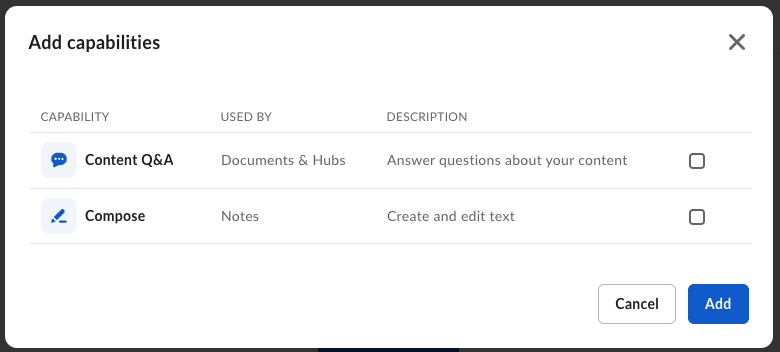
ModeParameterDescription
AskaskAnswer user questions about documents
Text generationtext_genGenerate text based on file content and prompts
ExtractionextractExtract metadata from documents
ai agent capabilities

Get started

Set up AI Studio

Create a platform app, enable the AI scope, and generate credentials to start making AI Studio API calls.

Create an agent

Use POST /ai_agents to create a custom AI agent with specific capabilities and access controls.

List agents

Retrieve all AI agents in your enterprise, filtered by mode or state.

Manage agents

Get, update, and delete agents by ID.
For admin setup instructions, see Enabling Box AI Studio and Managing Agents.