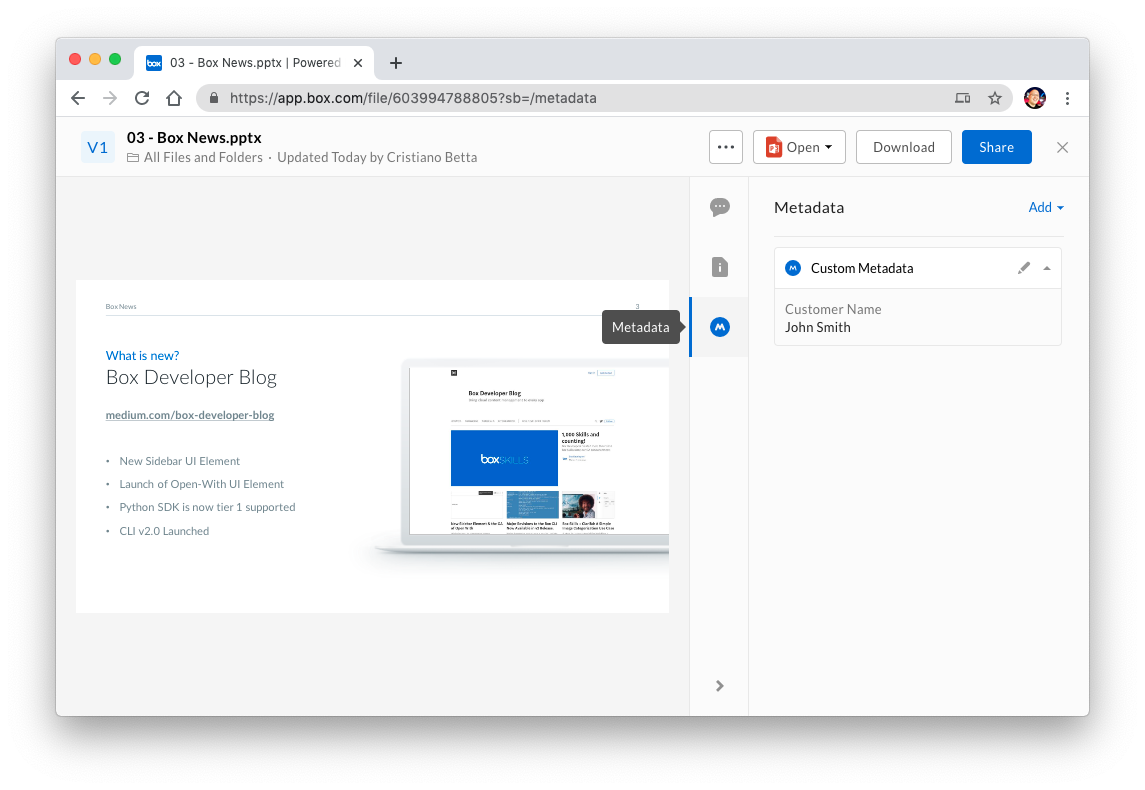
Metadata allows users and applications to define and store custom data
associated with files and folders.
Metadata consists of key/value pairs that are assigned to a file or a folder.
For example, an important contract may have the key/value pairs of
clientNumber: 820183 and clientName: bioMedicalCorp.
Working with metadata requires a developer to work with a few
distinct types of resources.
- Templates: A describes a re-usable set of key/value pairs that can be assigned to a file. For example, an
invoiceData template might hold data about an invoice, having a field for the invoice ID as well as the customer ID.
- Fields: A describes a specific piece of data within a metadata template. For example, the ID of an invoice might be represented as an
id field on an invoiceData template.
- Instances: A describes the relation between a template and a file or folder, including the values that are assigned for every field. For example, a user might have assigned an
invoiceData metadata template to a file and provided 2 values, one for the invoice ID and one for the customer ID. You can assign up to 100 templates to a specific file or folder.
- Cascade Policies: A describes how metadata instances applied to a folder should be applied to any item within that folder. For example, a user might assign the same
invoiceData metadata template to a project folder (including the 2 values), allowing them to automatically apply to all the files and folders within that project folder.
- Queries: A provides a way to find files and folders by searching for the metadata attached to them. For example, to find all the files for an invoice with a certain ID, the query would look for all files and folders with the
invoiceData template attached to it and a value of id = :id, where :id would be the value of the invoice.
Metadata can be used for many purposes. Enterprises may want to have a better
way to organize their digital assets for their marketing teams, or developers
may want to provide advanced content functionality such as facilitating
workflows or approvals.
For example, a marketingCollateral template may define where and when specific
marketing content should be used. Users can see a representation of the
template in the Box web application while navigating to a file preview.
Quick example
Retrieve all metadata instances applied to a file:
To learn more, please visit Box community articles. Last modified on September 18, 2026