> ## Documentation Index
> Fetch the complete documentation index at: https://developer.box.com/llms.txt
> Use this file to discover all available pages before exploring further.
# Extra security (2FA)
Box Sign enables senders to provide an [additional layer of security][2FA] for their signature requests and reusable templates. You can require signers to verify their identity through CAC/PIV smart card authentication, SMS multifactor authentication, or Box account login. A password can be added alongside any of these verification methods for an extra layer of protection.
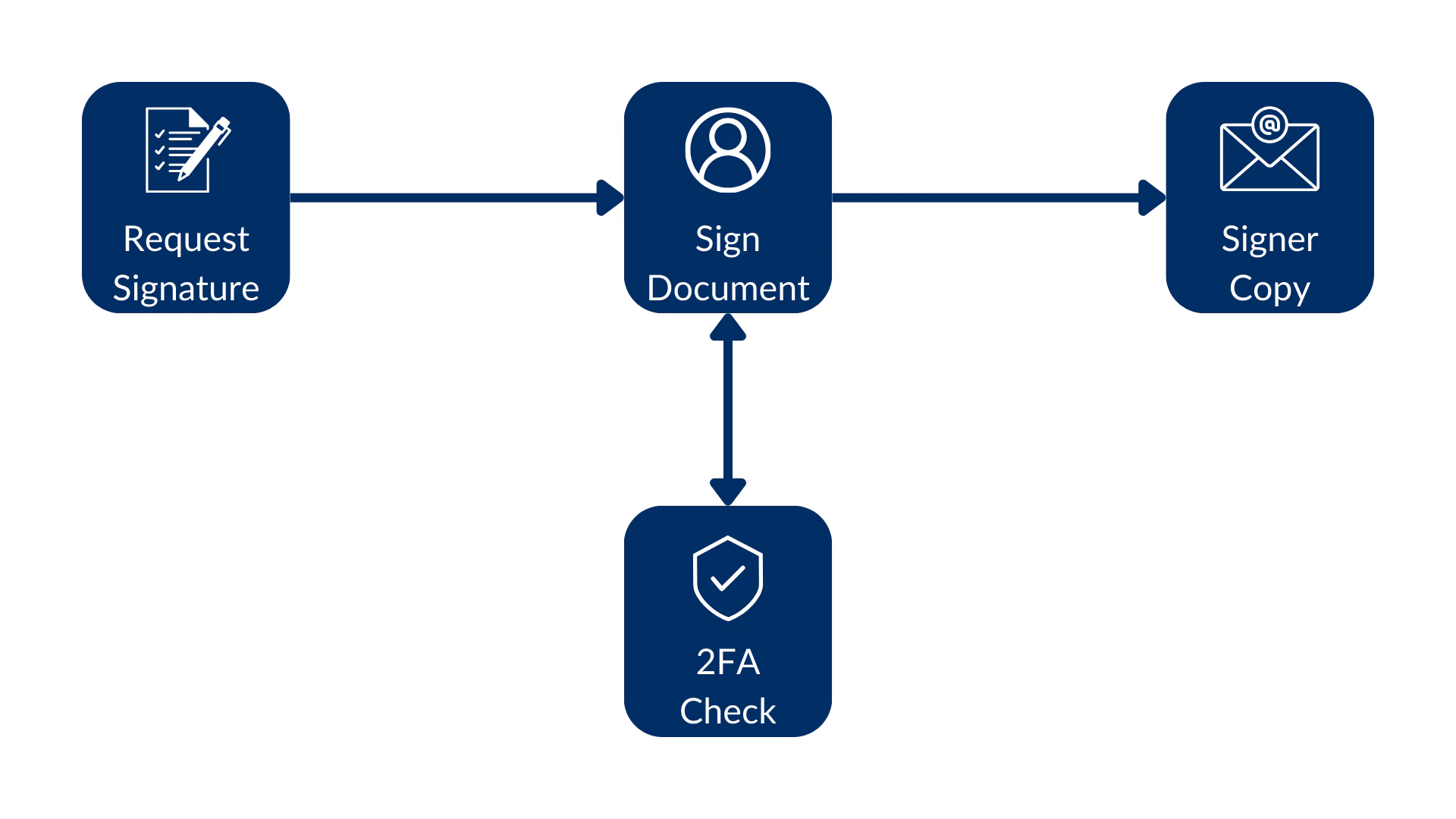 You can add the additional layer of security in a template or when
you create a signature request.
## Verification method (recommended)
The `verification_method` property on the `signer` object provides a unified
way to configure signer verification when you create a sign request. This
approach is recommended for new integrations because it uses a consistent
structure across all verification types. Set the `type` field to specify
which method to use.
Supported types:
| Type | Description |
| --------- | ----------------------------------------------------------------------------------- |
| `cac_piv` | Requires the signer to verify with a CAC/PIV smart card. |
| `phone` | Requires the signer to complete SMS verification. Include the `phone_number` field. |
| `login` | Requires the signer to log in to their Box account before signing. |
When you query a sign request or sign template, the `verification_method`
property on each signer shows which verification method is set. A `null`
value means the signer doesn't need to complete verification.
If you set both `verification_method` and a legacy verification property
(such as `login_required` or `verification_phone_number`) on the same
signer, `verification_method` takes precedence. The API ignores the
legacy property.
### CAC/PIV smart card verification
To require a signer to verify their identity with a CAC/PIV smart card,
set `verification_method` on the signer to `{ "type": "cac_piv" }`.
Your enterprise must have CAC/PIV permissions enabled to use smart card
authentication. If the enterprise does not have the required permissions,
the API returns a `403 Forbidden` error. Please contact your account team to learn more about the CAC/PIV smart card authentication.
If the sign request has multiple signers, you must provide a signing
order when using `cac_piv` as the verification method. For a single
signer, signing order is not required.
```sh cURL theme={null}
curl --location 'https://api.box.com/2.0/sign_requests' \
--header 'Content-Type: application/json' \
--header 'Authorization: Bearer ej...3t' \
--data-raw '{
"parent_folder": {
"id": "234102987614",
"type": "folder"
},
"source_files": [
{
"id": "1358047520478",
"type": "file"
}
],
"signers": [
{
"email": "signer@example.com",
"role": "signer",
"verification_method": {
"type": "cac_piv"
}
}
]
}'
```
### SMS verification
To require SMS verification, set `verification_method` on the signer to
`{ "type": "phone", "phone_number": "" }`. The phone number
must include a country code, prefixed with either `+` or `00`
(for example, `+15551232190` or `0015551232190`).
```sh cURL theme={null}
curl --location 'https://api.box.com/2.0/sign_requests' \
--header 'Content-Type: application/json' \
--header 'Authorization: Bearer ej...3t' \
--data-raw '{
"parent_folder": {
"id": "234102987614",
"type": "folder"
},
"source_files": [
{
"id": "1358047520478",
"type": "file"
}
],
"signers": [
{
"email": "signer@example.com",
"role": "signer",
"verification_method": {
"type": "phone",
"phone_number": "+15551232190"
}
}
]
}'
```
### Login verification
To require the signer to log in to their Box account before signing, set
`verification_method` on the signer to `{ "type": "login" }`. This is the
recommended alternative to the `login_required` parameter.
```sh cURL theme={null}
curl --location 'https://api.box.com/2.0/sign_requests' \
--header 'Content-Type: application/json' \
--header 'Authorization: Bearer ej...3t' \
--data-raw '{
"parent_folder": {
"id": "234102987614",
"type": "folder"
},
"source_files": [
{
"id": "1358047520478",
"type": "file"
}
],
"signers": [
{
"email": "signer@example.com",
"role": "signer",
"verification_method": {
"type": "login"
}
}
]
}'
```
## Password verification
You can require the signer to use a password to open the signature request
by passing the `password` parameter in the `signer` object. For example:
```sh cURL theme={null}
curl --location 'https://api.box.com/2.0/sign_requests' \
--header 'Content-Type: application/json' \
--header 'Authorization: Bearer ej...3t' \
--data-raw '{
"is_document_preparation_needed": true,
"parent_folder": {
"id": "234102987614",
"type": "folder"
},
"source_files": [
{
"id": "1358047520478",
"type": "file"
}
],
"signers": [
{
"email": "verify@example.com",
"role": "signer",
"password": "1234"
}
]
}'
```
```python Python Gen SDK theme={null}
def sign_doc_verify_password(
client: Client,
document_id: str,
destination_folder_id: str,
signer_email: str,
signer_password: str,
) -> SignRequest:
# Sign request params
source_file = FileBase(id=document_id, type=FileBaseTypeField.FILE)
destination_folder = FolderMini(
id=destination_folder_id, type=FolderBaseTypeField.FOLDER
)
# signer
signer = SignRequestCreateSigner(
email=signer_email,
password=signer_password,
)
# sign document
sign_request = client.sign_requests.create_sign_request(
signers=[signer],
parent_folder=destination_folder,
source_files=[source_file],
)
return sign_request
def main():
...
# Sign with phone verification
sign_with_password_verification = sign_doc_verify_password(
client,
SIMPLE_PDF,
SIGN_DOCS_FOLDER,
SIGNER_A,
"1234",
)
```
Once the signer opens the signature request they should see something like this:
You can add the additional layer of security in a template or when
you create a signature request.
## Verification method (recommended)
The `verification_method` property on the `signer` object provides a unified
way to configure signer verification when you create a sign request. This
approach is recommended for new integrations because it uses a consistent
structure across all verification types. Set the `type` field to specify
which method to use.
Supported types:
| Type | Description |
| --------- | ----------------------------------------------------------------------------------- |
| `cac_piv` | Requires the signer to verify with a CAC/PIV smart card. |
| `phone` | Requires the signer to complete SMS verification. Include the `phone_number` field. |
| `login` | Requires the signer to log in to their Box account before signing. |
When you query a sign request or sign template, the `verification_method`
property on each signer shows which verification method is set. A `null`
value means the signer doesn't need to complete verification.
If you set both `verification_method` and a legacy verification property
(such as `login_required` or `verification_phone_number`) on the same
signer, `verification_method` takes precedence. The API ignores the
legacy property.
### CAC/PIV smart card verification
To require a signer to verify their identity with a CAC/PIV smart card,
set `verification_method` on the signer to `{ "type": "cac_piv" }`.
Your enterprise must have CAC/PIV permissions enabled to use smart card
authentication. If the enterprise does not have the required permissions,
the API returns a `403 Forbidden` error. Please contact your account team to learn more about the CAC/PIV smart card authentication.
If the sign request has multiple signers, you must provide a signing
order when using `cac_piv` as the verification method. For a single
signer, signing order is not required.
```sh cURL theme={null}
curl --location 'https://api.box.com/2.0/sign_requests' \
--header 'Content-Type: application/json' \
--header 'Authorization: Bearer ej...3t' \
--data-raw '{
"parent_folder": {
"id": "234102987614",
"type": "folder"
},
"source_files": [
{
"id": "1358047520478",
"type": "file"
}
],
"signers": [
{
"email": "signer@example.com",
"role": "signer",
"verification_method": {
"type": "cac_piv"
}
}
]
}'
```
### SMS verification
To require SMS verification, set `verification_method` on the signer to
`{ "type": "phone", "phone_number": "" }`. The phone number
must include a country code, prefixed with either `+` or `00`
(for example, `+15551232190` or `0015551232190`).
```sh cURL theme={null}
curl --location 'https://api.box.com/2.0/sign_requests' \
--header 'Content-Type: application/json' \
--header 'Authorization: Bearer ej...3t' \
--data-raw '{
"parent_folder": {
"id": "234102987614",
"type": "folder"
},
"source_files": [
{
"id": "1358047520478",
"type": "file"
}
],
"signers": [
{
"email": "signer@example.com",
"role": "signer",
"verification_method": {
"type": "phone",
"phone_number": "+15551232190"
}
}
]
}'
```
### Login verification
To require the signer to log in to their Box account before signing, set
`verification_method` on the signer to `{ "type": "login" }`. This is the
recommended alternative to the `login_required` parameter.
```sh cURL theme={null}
curl --location 'https://api.box.com/2.0/sign_requests' \
--header 'Content-Type: application/json' \
--header 'Authorization: Bearer ej...3t' \
--data-raw '{
"parent_folder": {
"id": "234102987614",
"type": "folder"
},
"source_files": [
{
"id": "1358047520478",
"type": "file"
}
],
"signers": [
{
"email": "signer@example.com",
"role": "signer",
"verification_method": {
"type": "login"
}
}
]
}'
```
## Password verification
You can require the signer to use a password to open the signature request
by passing the `password` parameter in the `signer` object. For example:
```sh cURL theme={null}
curl --location 'https://api.box.com/2.0/sign_requests' \
--header 'Content-Type: application/json' \
--header 'Authorization: Bearer ej...3t' \
--data-raw '{
"is_document_preparation_needed": true,
"parent_folder": {
"id": "234102987614",
"type": "folder"
},
"source_files": [
{
"id": "1358047520478",
"type": "file"
}
],
"signers": [
{
"email": "verify@example.com",
"role": "signer",
"password": "1234"
}
]
}'
```
```python Python Gen SDK theme={null}
def sign_doc_verify_password(
client: Client,
document_id: str,
destination_folder_id: str,
signer_email: str,
signer_password: str,
) -> SignRequest:
# Sign request params
source_file = FileBase(id=document_id, type=FileBaseTypeField.FILE)
destination_folder = FolderMini(
id=destination_folder_id, type=FolderBaseTypeField.FOLDER
)
# signer
signer = SignRequestCreateSigner(
email=signer_email,
password=signer_password,
)
# sign document
sign_request = client.sign_requests.create_sign_request(
signers=[signer],
parent_folder=destination_folder,
source_files=[source_file],
)
return sign_request
def main():
...
# Sign with phone verification
sign_with_password_verification = sign_doc_verify_password(
client,
SIMPLE_PDF,
SIGN_DOCS_FOLDER,
SIGNER_A,
"1234",
)
```
Once the signer opens the signature request they should see something like this:
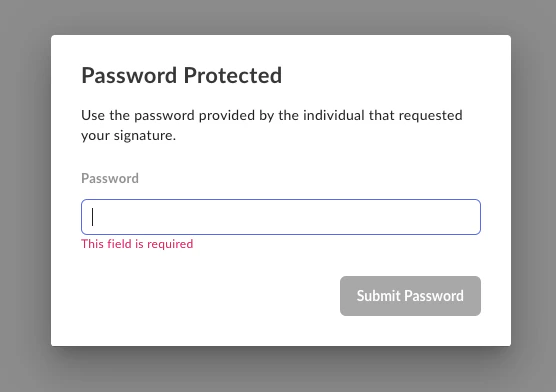 As the password verification is done on the first step, it prevents the
signer from accessing the document until the correct password is provided.
## SMS verification (legacy)
You can also configure SMS verification using the
`verification_phone_number` parameter on the signer object. This approach
is fully supported, but for new integrations we recommend using
`verification_method` instead for a consistent experience across all
verification types.
To require the signer to complete SMS verification, pass the
`verification_phone_number` parameter along with their phone number.
For example:
```sh cURL theme={null}
curl --location 'https://api.box.com/2.0/sign_requests' \
--header 'Content-Type: application/json' \
--header 'Authorization: Bearer ej...3t' \
--data-raw '{
"is_document_preparation_needed": true,
"is_phone_verification_required_to_view": true,
"parent_folder": {
"id": "234102987614",
"type": "folder"
},
"source_files": [
{
"id": "1358047520478",
"type": "file"
}
],
"signers": [
{
"email": "verify@example.com",
"role": "signer",
"verification_phone_number": "+15551232190"
}
]
}'
```
```python Python Gen SDK theme={null}
def sign_doc_verify_phone(
client: Client,
document_id: str,
destination_folder_id: str,
signer_email: str,
signer_phone: str,
) -> SignRequest:
# Sign request params
source_file = FileBase(id=document_id, type=FileBaseTypeField.FILE)
destination_folder = FolderMini(
id=destination_folder_id, type=FolderBaseTypeField.FOLDER
)
signer = SignRequestCreateSigner(
email=signer_email,
verification_phone_number=signer_phone,
)
# sign document
sign_request = client.sign_requests.create_sign_request(
signers=[signer],
parent_folder=destination_folder,
source_files=[source_file],
is_phone_verification_required_to_view=True,
)
return sign_request
def main():
...
# Sign with phone verification
sign_with_phone_verification = sign_doc_verify_phone(
client,
SIMPLE_PDF,
SIGN_DOCS_FOLDER,
SIGNER_A,
SIGNER_A_PHONE,
)
check_sign_request(sign_with_phone_verification)
```
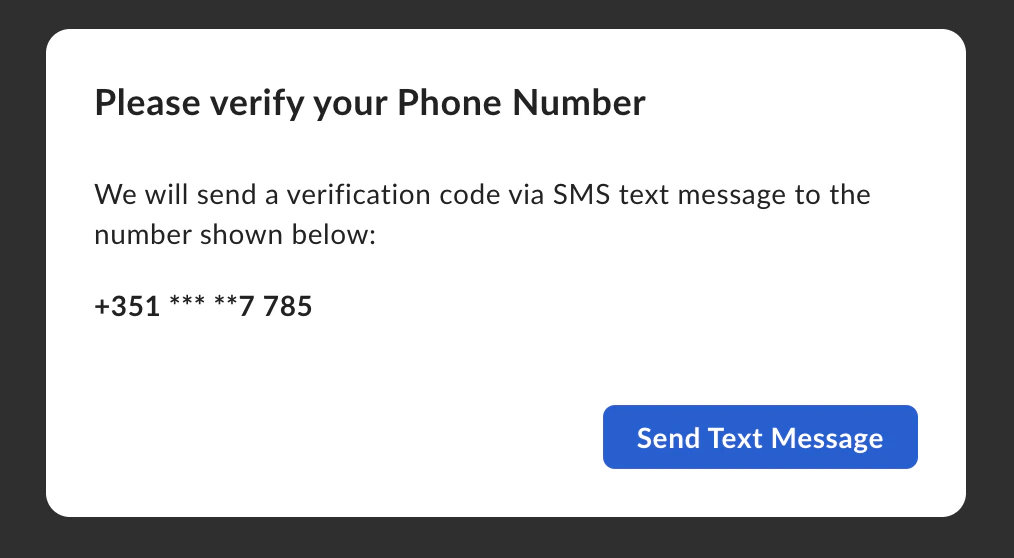
When the signer tries to access the signature request an SMS verification dialog pops up:
As the password verification is done on the first step, it prevents the
signer from accessing the document until the correct password is provided.
## SMS verification (legacy)
You can also configure SMS verification using the
`verification_phone_number` parameter on the signer object. This approach
is fully supported, but for new integrations we recommend using
`verification_method` instead for a consistent experience across all
verification types.
To require the signer to complete SMS verification, pass the
`verification_phone_number` parameter along with their phone number.
For example:
```sh cURL theme={null}
curl --location 'https://api.box.com/2.0/sign_requests' \
--header 'Content-Type: application/json' \
--header 'Authorization: Bearer ej...3t' \
--data-raw '{
"is_document_preparation_needed": true,
"is_phone_verification_required_to_view": true,
"parent_folder": {
"id": "234102987614",
"type": "folder"
},
"source_files": [
{
"id": "1358047520478",
"type": "file"
}
],
"signers": [
{
"email": "verify@example.com",
"role": "signer",
"verification_phone_number": "+15551232190"
}
]
}'
```
```python Python Gen SDK theme={null}
def sign_doc_verify_phone(
client: Client,
document_id: str,
destination_folder_id: str,
signer_email: str,
signer_phone: str,
) -> SignRequest:
# Sign request params
source_file = FileBase(id=document_id, type=FileBaseTypeField.FILE)
destination_folder = FolderMini(
id=destination_folder_id, type=FolderBaseTypeField.FOLDER
)
signer = SignRequestCreateSigner(
email=signer_email,
verification_phone_number=signer_phone,
)
# sign document
sign_request = client.sign_requests.create_sign_request(
signers=[signer],
parent_folder=destination_folder,
source_files=[source_file],
is_phone_verification_required_to_view=True,
)
return sign_request
def main():
...
# Sign with phone verification
sign_with_phone_verification = sign_doc_verify_phone(
client,
SIMPLE_PDF,
SIGN_DOCS_FOLDER,
SIGNER_A,
SIGNER_A_PHONE,
)
check_sign_request(sign_with_phone_verification)
```
When the signer tries to access the signature request an SMS verification dialog pops up:
 Then the signer is prompted to enter the code sent in an SMS:
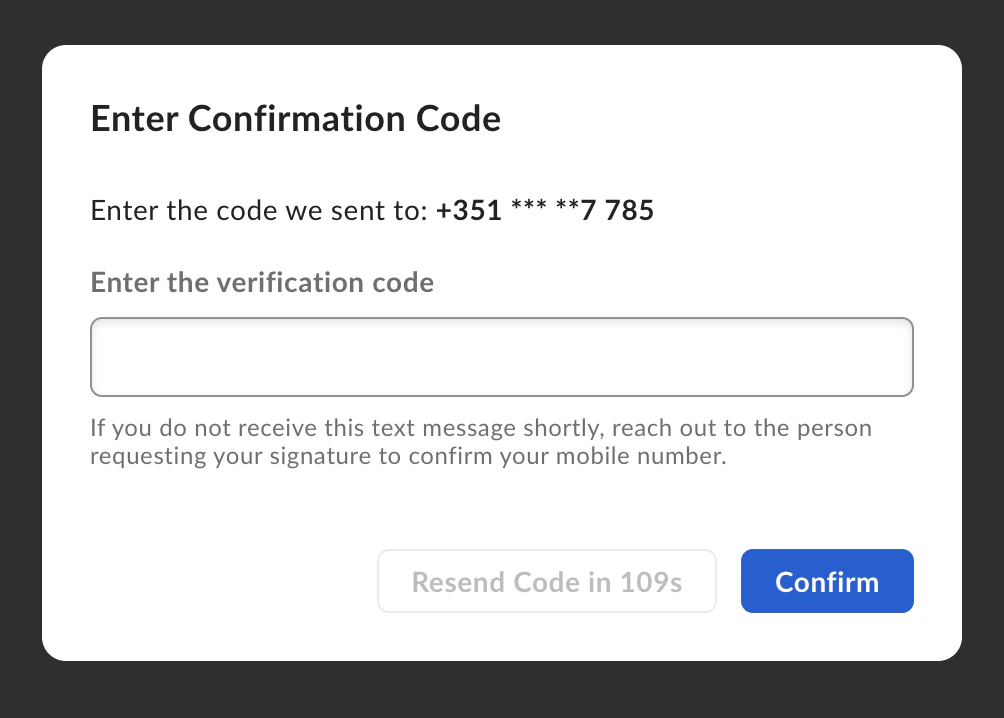 By default, SMS verification is required at the signing step, which means
the signer can view the document before completing the verification. To
require SMS verification before the signer can view the document, set the
`is_phone_verification_required_to_view` parameter to `true` when creating
the sign request.
[2FA]: https://support.box.com/hc/en-us/articles/4406861109907-Additional-Signer-Authentication
By default, SMS verification is required at the signing step, which means
the signer can view the document before completing the verification. To
require SMS verification before the signer can view the document, set the
`is_phone_verification_required_to_view` parameter to `true` when creating
the sign request.
[2FA]: https://support.box.com/hc/en-us/articles/4406861109907-Additional-Signer-Authentication