> ## Documentation Index
> Fetch the complete documentation index at: https://developer.box.com/llms.txt
> Use this file to discover all available pages before exploring further.

# Create an iOS App

export const ProgressBar = ({pages = [], ...props}) => {
  const [currentStep, setCurrentStep] = useState(0);
  const [isDarkMode, setIsDarkMode] = useState(false);
  useEffect(() => {
    const checkDarkMode = () => {
      const isDark = document.documentElement.classList.contains('dark');
      console.log('ProgressBar - isDarkMode:', isDark);
      setIsDarkMode(isDark);
    };
    checkDarkMode();
    const observer = new MutationObserver(() => {
      checkDarkMode();
    });
    observer.observe(document.documentElement, {
      attributes: true,
      attributeFilter: ['class']
    });
    return () => {
      observer.disconnect();
    };
  }, []);
  useEffect(() => {
    if (pages.length > 0) {
      const currentPath = window.location.pathname;
      const stepIndex = pages.findIndex(page => {
        const pagePath = page.startsWith('/') ? page : `/${page}`;
        return currentPath.endsWith(pagePath) || currentPath.includes(pagePath);
      });
      if (stepIndex !== -1) {
        setCurrentStep(stepIndex + 1);
      }
    }
  }, [pages]);
  if (!pages || pages.length === 0) {
    return null;
  }
  const step = currentStep;
  const total = pages.length;
  console.log('ProgressBar - Rendering with isDarkMode:', isDarkMode);
  const progressBarContainerStyle = {
    width: '100%',
    marginBottom: '32px',
    display: 'flex',
    alignItems: 'center',
    gap: '16px'
  };
  const stepsContainerStyle = {
    display: 'flex',
    alignItems: 'center',
    gap: '8px',
    flexShrink: 0
  };
  const progressBarTrackStyle = {
    flex: 1,
    height: '22px',
    backgroundColor: 'rgba(169, 210, 244, 0.06)',
    border: isDarkMode ? '1px solid rgba(230, 241, 247, 0.67)' : '1px solid #e3ecf3',
    borderRadius: '4px',
    overflow: 'hidden',
    position: 'relative'
  };
  const progressBarFillStyle = {
    height: '100%',
    backgroundColor: 'rgba(113, 192, 248, 0.23)',
    width: `${step / total * 100}%`,
    transition: 'width 0.3s ease'
  };
  const getStepStyle = (stepNumber, isActive) => {
    if (isDarkMode) {
      return {
        width: '22px',
        height: '22px',
        borderRadius: '4px',
        display: 'flex',
        alignItems: 'center',
        justifyContent: 'center',
        fontSize: '12px',
        fontWeight: '600',
        position: 'relative',
        zIndex: 1,
        transition: 'all 0.3s ease',
        backgroundColor: isActive ? 'rgba(113, 192, 248, 0.23)' : 'transparent',
        color: isActive ? '#60a5fa' : '#a0aec0',
        border: isActive ? '1px solid #e3ecf3' : '1px solid #e0e6eb',
        cursor: 'pointer',
        textDecoration: 'none'
      };
    }
    if (isActive) {
      return {
        width: '22px',
        height: '22px',
        borderRadius: '4px',
        display: 'flex',
        alignItems: 'center',
        justifyContent: 'center',
        fontSize: '12px',
        fontWeight: '600',
        position: 'relative',
        zIndex: 1,
        transition: 'all 0.3s ease',
        backgroundColor: 'rgba(169, 210, 244, 0.32)',
        color: '#374151',
        border: '1px solid #e1eef8',
        cursor: 'pointer',
        textDecoration: 'none'
      };
    }
    return {
      width: '22px',
      height: '22px',
      borderRadius: '4px',
      display: 'flex',
      alignItems: 'center',
      justifyContent: 'center',
      fontSize: '12px',
      fontWeight: '600',
      position: 'relative',
      zIndex: 1,
      transition: 'all 0.3s ease',
      backgroundColor: '#fbfbfb',
      color: '#9ca3af',
      border: '1px solid #e3ecf3',
      cursor: 'pointer',
      textDecoration: 'none'
    };
  };
  return <div style={progressBarContainerStyle} {...props}>
      <div style={stepsContainerStyle}>
        {Array.from({
    length: total
  }, (_, index) => {
    const stepNumber = index + 1;
    const pageIndex = index;
    const pagePath = pages[pageIndex];
    const fullPath = pagePath.startsWith('/') ? pagePath : `/${pagePath}`;
    const isActive = stepNumber === step;
    return <a key={stepNumber} href={fullPath} style={getStepStyle(stepNumber, isActive)}>
              {stepNumber}
            </a>;
  })}
      </div>
      <div style={progressBarTrackStyle}>
        <div style={progressBarFillStyle}></div>
      </div>
    </div>;
};

<ProgressBar
  pages={[
                      "guides/mobile/ios/quick-start/create-ios-app",
                      "guides/mobile/ios/quick-start/install-ios-sdk",
                      "guides/mobile/ios/quick-start/configure-box-app",
                      "guides/mobile/ios/quick-start/make-api-call",
                      "guides/mobile/ios/quick-start/next-steps"
                    ]}
/>

Before installing the Box iOS SDK you'll need to have an iOS application
available to add the dependencies into. We'll create a new blank application
now.

## Setup an iOS App

Xcode will be the tool that we use to create and edit our iOS application
during this quick-start guide. If you don't have Xcode, download it now from the
[Apple developer site](https://developer.apple.com/xcode/).

If this is the first application you're creating in Xcode or you already have
application development experience in it, we'll start our integration of the
Box iOS SDK with a new blank application.

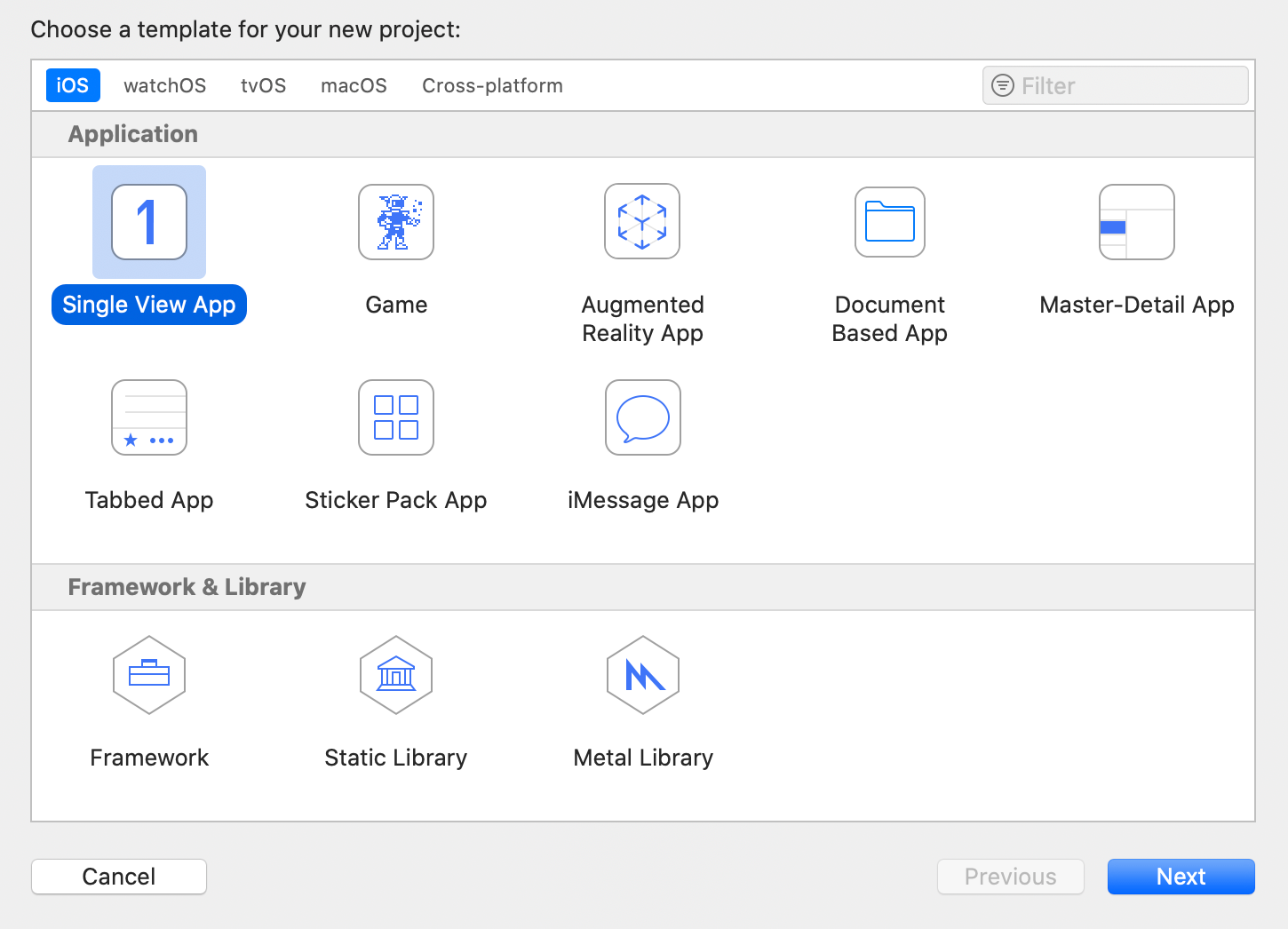
1. Start Xcode
2. From the top menu, select **File** -> **New** -> **Project...**
3. Select the option for **Single View App**
   <Frame center>
     <img src="https://mintcdn.com/box/K3l9SyfYdcG-z-Ku/guides/mobile/ios/quick-start/create-app-type.png?fit=max&auto=format&n=K3l9SyfYdcG-z-Ku&q=85&s=a017494beeac5af4ac411eb081805679" alt="Select iOS application type" width="1450" height="1046" data-path="guides/mobile/ios/quick-start/create-app-type.png" />
   </Frame>
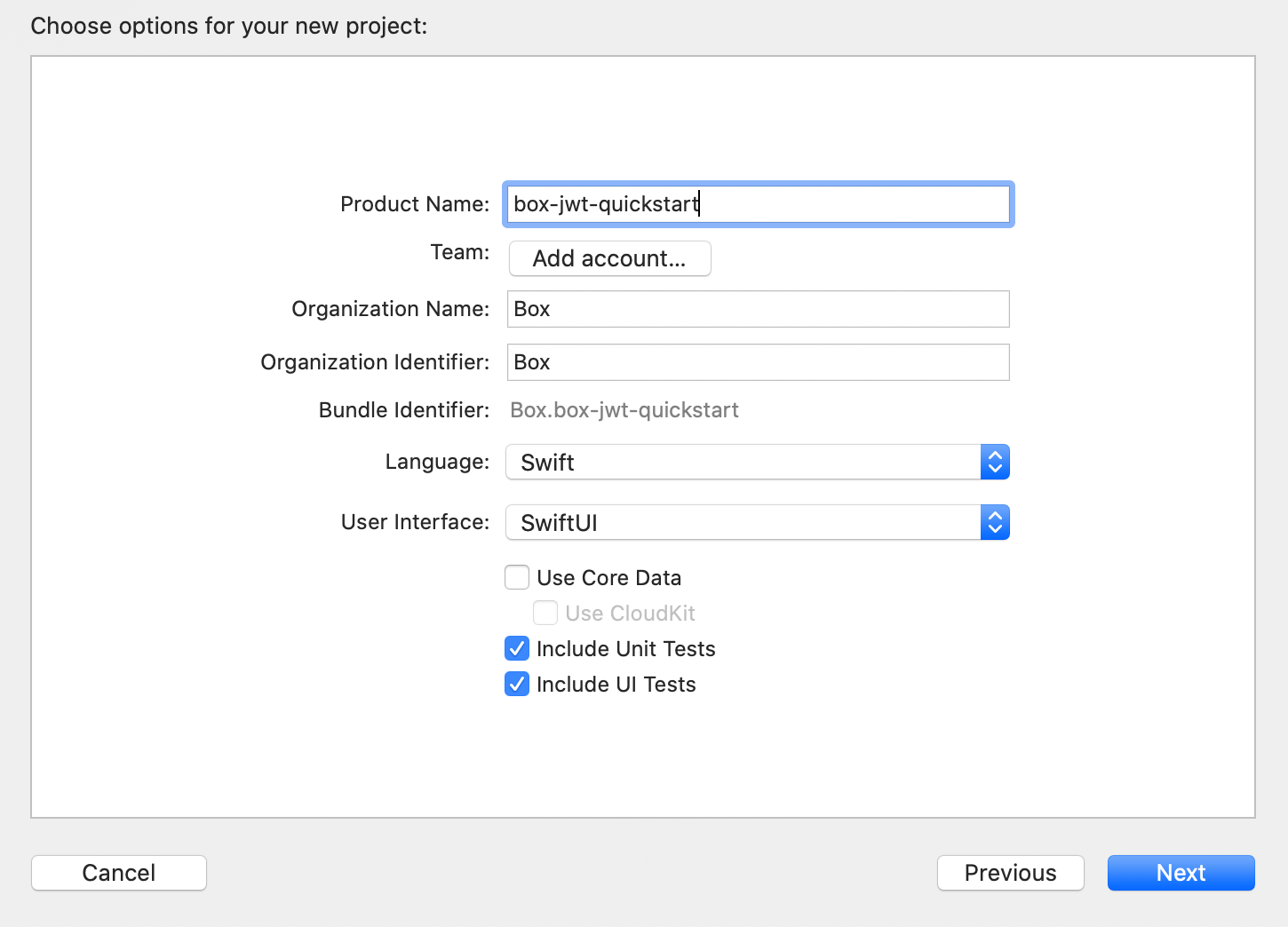
4. Enter your application configuration information, including the `Product Name`, `Organization Identifier`, and `Organization Name`.
   <Frame center>
     <img src="https://mintcdn.com/box/K3l9SyfYdcG-z-Ku/guides/mobile/ios/quick-start/create-app-config.png?fit=max&auto=format&n=K3l9SyfYdcG-z-Ku&q=85&s=6de733e51d848fb1088eb2562cb33fe9" alt="Configure iOS application" width="1450" height="1044" data-path="guides/mobile/ios/quick-start/create-app-config.png" />
   </Frame>
5. Select a local storage location for the application and click **Create**

## Summary

* You created a new blank iOS application in Xcode

<Next>I created a blank iOS application</Next>
