> ## Documentation Index
> Fetch the complete documentation index at: https://developer.box.com/llms.txt
> Use this file to discover all available pages before exploring further.
# Multi Select metadata field
export const MultiRelatedLinks = ({sections = []}) => {
if (!sections || sections.length === 0) {
return null;
}
return
;
};
export const Link = ({href, children, className, ...props}) => {
const localizedHref = localizeLink(href);
return
{children}
;
};
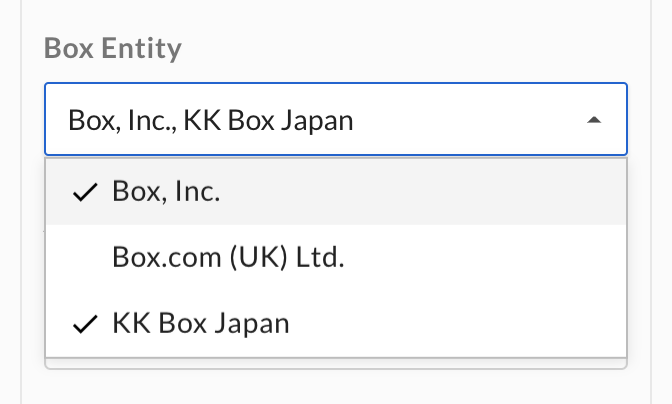
A metadata field of type `multiSelect` is displayed to a user as a dropdown
list. The user can select multiple items from the list.
A `multiSelect` field allows a user to select zero, one, or more values. To force
a user to select only one value at most, use the `enum` template
field.
## Create a `multiSelect` field
A `multiSelect` field can be added to a metadata template either when creating
a metadata template, or when updating a
template with the `addField` operation.
The required attributes for a `multiSelect` field are a `type`, a `displayName`,
a `key`, and a list of options.
```json theme={null}
{
"scope": "enterprise",
"displayName": "Contract",
"fields": [
{
"type": "multiSelect",
"key": "box_entity",
"displayName": "Box Entity",
"description": "The Box entity that this contract belongs to",
"hidden": false,
"options": [
{"key": "Box, Inc"},
{"key": "Box.com (UK) Ltd."},
{"key": "KK Box Japan"}
]
}
]
}
```
Optionally, a `description` can be provided that is shown to a user in the UI,
and the field can be set to `hidden` to hide it from users in the web and mobile
apps.
## Update a `multiSelect` field
A `multiSelect` template field can be updated by updating the
template it belongs to. Updates to templates happen through
**operations** to ensure that any template that is already assigned to a file or
folder is updated as well.
### Change basic field values
When updating a `multiSelect` metadata field, one of the possible operations is
the `editField` operation, which can be used to change the field's `key`,
`displayName`, `description`, and `hidden` values.
```json theme={null}
[
{
"op": "editField",
"fieldKey": "box_entity",
"data": {
"displayName": "Box Entities",
"key": "box_entities"
}
}
]
```
The `fieldKey` here represents the original key of the field to change. The
`data.key` field is the new key of the field.
This will affect existing instances of this template.
### Add an option
Adding an option to a `multiSelect` field can be achieved through the
`addMultiSelectOption` operation. The operation expects the `fieldKey` to be set
to the key of the `multiSelect` field to change, and a `data` object with the
`key` of the new option to add.
```json theme={null}
[
{
"op": "addMultiSelectOption",
"fieldKey": "box_entity",
"data": {
"key": "Box (NL) BV"
}
}
]
```
The list of options should now be as follows.
```json theme={null}
...
"options": [
{"key": "Box, Inc"},
{"key": "Box.com (UK) Ltd."},
{"key": "KK Box Japan"},
{"key": "Box (NL) BV"}
]
...
```
This will affect existing instances of this template.
### Reorder options
Reordering the options in a `multiSelect` field can be achieved through the
`reorderMultiSelectOptions` operation. The operation expects the `fieldKey` to
be set to the key of the `multiSelect` field to change, and a
`multiSelectOptionKeys` array with the keys of the options in order.
```json theme={null}
[
{
"op": "reorderMultiSelectOptions",
"fieldKey": "box_entity",
"multiSelectOptionKeys": [
"Box, Inc",
"Box.com (UK) Ltd.",
"Box (NL) BV",
"KK Box Japan"
]
}
]
```
The list of options should now be as follows.
```json theme={null}
...
"options": [
{"key": "Box, Inc"},
{"key": "Box.com (UK) Ltd."},
{"key": "Box (NL) BV"},
{"key": "KK Box Japan"}
]
...
```
New options can not be added with this operation. This will affect existing
instances of this template.
### Edit an option
Editing an option of a `multiSelect` field can be achieved through the
`editMultiSelectOption` operation. The operation expects the `fieldKey` to be
set to the key of the `multiSelect` field to change, and a
`multiSelectOptionKey` to be set to the key of the field option. Finally, it
expects a `data` object with the new `key` of the field option.
```json theme={null}
[
{
"op": "editMultiSelectOption",
"fieldKey": "box_entity",
"multiSelectOptionKey": "Box (NL) BV",
"data": {
"key": "Box.nl BV"
}
}
]
```
The list of options should now be as follows.
```json theme={null}
...
"options": [
{"key": "Box, Inc"},
{"key": "Box.com (UK) Ltd."},
{"key": "Box.nl BV"},
{"key": "KK Box Japan"}
]
...
```
This will affect existing instances of this template.
### Remove an option
Removing an option from a `multiSelect` field can be achieved through the
`removeMultiSelectOption` operation. The operation expects the `fieldKey` to be set
to the key of the `multiSelect` field to change, and a `multiSelectOptionKey`
to be set to the key of the field option to remove.
```json theme={null}
[
{
"op": "removeMultiSelectOption",
"fieldKey": "customer_state",
"multiSelectOptionKey": "KK Box Japan"
}
]
```
The list of options should now be as follows.
```json theme={null}
...
"options": [
{"key": "Box, Inc"},
{"key": "Box.com (UK) Ltd."},
{"key": "Box.nl BV"}
]
...
```
This will affect existing instances of this template. Any fields that were set
to this value will have the value removed from its list of selected values.