> ## Documentation Index
> Fetch the complete documentation index at: https://developer.box.com/llms.txt
> Use this file to discover all available pages before exploring further.
# Create Box Sign Request
export const MultiRelatedLinks = ({sections = []}) => {
if (!sections || sections.length === 0) {
return null;
}
return
;
};
export const Link = ({href, children, className, ...props}) => {
const localizedHref = localizeLink(href);
return
{children}
;
};
To create a Box Sign request you need a file you want to be signed, a destination folder for the signed
document/[signing log][log], and signers.
```sh cURL theme={null}
curl -i -X POST "https://api.box.com/2.0/sign_requests" \
-H "authorization: Bearer " \
-d '{
"signers": [
{
"role": "signer",
"email": "example_email@box.com"
}
],
"source_files": [
{
"type": "file",
"id": "123456789"
}
],
"parent_folder":
{
"type": "folder",
"id": "0987654321"
}
}'
```
```typescript Node/TypeScript v10 theme={null}
await client.signRequests.createSignRequest({
signers: [
{
email: signerEmail,
suppressNotifications: true,
declinedRedirectUrl: 'https://www.box.com',
embedUrlExternalUserId: '123',
isInPerson: false,
loginRequired: false,
password: 'password',
role: 'signer' as SignRequestCreateSignerRoleField,
} satisfies SignRequestCreateSigner,
],
areRemindersEnabled: true,
areTextSignaturesEnabled: true,
daysValid: 30,
declinedRedirectUrl: 'https://www.box.com',
emailMessage: 'Please sign this document',
emailSubject: 'Sign this document',
externalId: '123',
externalSystemName: 'BoxSignIntegration',
isDocumentPreparationNeeded: false,
name: 'Sign Request',
parentFolder: new FolderMini({ id: destinationFolder.id }),
redirectUrl: 'https://www.box.com',
prefillTags: [
{
dateValue: dateFromString('2035-01-01'),
documentTagId: '0',
} satisfies SignRequestPrefillTag,
],
sourceFiles: [new FileBase({ id: fileToSign.id })],
} satisfies SignRequestCreateRequest);
```
```python Python v10 theme={null}
client.sign_requests.create_sign_request(
[
SignRequestCreateSigner(
email=signer_email,
suppress_notifications=True,
declined_redirect_url="https://www.box.com",
embed_url_external_user_id="123",
is_in_person=False,
login_required=False,
password="password",
role=SignRequestCreateSignerRoleField.SIGNER,
)
],
source_files=[FileBase(id=file_to_sign.id)],
parent_folder=FolderMini(id=destination_folder.id),
is_document_preparation_needed=False,
redirect_url="https://www.box.com",
declined_redirect_url="https://www.box.com",
are_text_signatures_enabled=True,
email_subject="Sign this document",
email_message="Please sign this document",
are_reminders_enabled=True,
name="Sign Request",
prefill_tags=[
SignRequestPrefillTag(
date_value=date_from_string("2035-01-01"), document_tag_id="0"
)
],
days_valid=30,
external_id="123",
external_system_name="BoxSignIntegration",
)
```
```cs .NET v10 theme={null}
await client.SignRequests.CreateSignRequestAsync(requestBody: new SignRequestCreateRequest(signers: Array.AsReadOnly(new [] {new SignRequestCreateSigner() { Email = signerEmail, SuppressNotifications = true, DeclinedRedirectUrl = "https://www.box.com", EmbedUrlExternalUserId = "123", IsInPerson = false, LoginRequired = false, Password = "password", Role = SignRequestCreateSignerRoleField.Signer }}), areRemindersEnabled: true, areTextSignaturesEnabled: true, daysValid: 30, declinedRedirectUrl: "https://www.box.com", emailMessage: "Please sign this document", emailSubject: "Sign this document", externalId: "123", externalSystemName: "BoxSignIntegration", isDocumentPreparationNeeded: false, name: "Sign Request", parentFolder: new FolderMini(id: destinationFolder.Id), redirectUrl: "https://www.box.com", prefillTags: Array.AsReadOnly(new [] {new SignRequestPrefillTag() { DateValue = Utils.DateFromString(date: "2035-01-01"), DocumentTagId = "0" }}), sourceFiles: Array.AsReadOnly(new [] {new FileBase(id: fileToSign.Id)})));
```
```swift Swift v10 theme={null}
try await client.signRequests.createSignRequest(requestBody: SignRequestCreateRequest(signers: [SignRequestCreateSigner(email: signerEmail, suppressNotifications: true, declinedRedirectUrl: "https://www.box.com", embedUrlExternalUserId: "123", isInPerson: false, loginRequired: false, password: "password", role: SignRequestCreateSignerRoleField.signer)], areRemindersEnabled: true, areTextSignaturesEnabled: true, daysValid: Int64(30), declinedRedirectUrl: "https://www.box.com", emailMessage: "Please sign this document", emailSubject: "Sign this document", externalId: "123", externalSystemName: "BoxSignIntegration", isDocumentPreparationNeeded: false, name: "Sign Request", parentFolder: FolderMini(id: destinationFolder.id), redirectUrl: "https://www.box.com", prefillTags: [SignRequestPrefillTag(dateValue: try Utils.Dates.dateFromString(date: "2035-01-01"), documentTagId: "0")], sourceFiles: [FileBase(id: fileToSign.id)]))
```
```java Java v10 theme={null}
client.getSignRequests().createSignRequest(new SignRequestCreateRequest.Builder(Arrays.asList(new SignRequestCreateSigner.Builder().email(signerEmail).role(SignRequestCreateSignerRoleField.SIGNER).isInPerson(false).embedUrlExternalUserId("123").declinedRedirectUrl("https://www.box.com").loginRequired(false).password("password").suppressNotifications(true).build())).sourceFiles(Arrays.asList(new FileBase(fileToSign.getId()))).parentFolder(new FolderMini(destinationFolder.getId())).isDocumentPreparationNeeded(false).redirectUrl("https://www.box.com").declinedRedirectUrl("https://www.box.com").areTextSignaturesEnabled(true).emailSubject("Sign this document").emailMessage("Please sign this document").areRemindersEnabled(true).name("Sign Request").prefillTags(Arrays.asList(new SignRequestPrefillTag.Builder().documentTagId("0").dateValue(dateFromString("2035-01-01")).build())).daysValid(30L).externalId("123").externalSystemName("BoxSignIntegration").build())
```
```java Java v5 theme={null}
List files = new ArrayList();
BoxSignRequestFile file = new BoxSignRequestFile("12345");
files.add(file);
// you can also use specific version of the file
BoxFile file = new BoxFile(api, "12345");
List versions = file.getVersions();
BoxFileVersion firstVersion = versions.get(0);
BoxSignRequestFile file = new BoxSignRequestFile(firstVersion.getFileID(), firstVersion.getVersionID());
List signers = new ArrayList();
BoxSignRequestSigner newSigner = new BoxSignRequestSigner("signer@mail.com");
signers.add(newSigner);
String destinationParentFolderId = "55555";
BoxSignRequest.Info signRequestInfo = BoxSignRequest.createSignRequest(api, files,
signers, destinationParentFolderId);
```
```python Python v4 theme={null}
source_file = {
'id': '12345',
'type': 'file'
}
files = [source_file]
signer = {
'name': 'John Doe',
'email': 'signer@mail.com'
}
signers = [signer]
parent_folder_id = '123456789'
new_sign_request = client.create_sign_request_v2(signers, files=files, parent_folder_id=parent_folder_id)
print(f'(Sign Request ID: {new_sign_request.id})')
```
```cs .NET v6 theme={null}
var sourceFiles = new List
{
new BoxSignRequestCreateSourceFile()
{
Id = "12345"
}
};
var signers = new List
{
new BoxSignRequestSignerCreate()
{
Email = "example@gmail.com"
}
};
var parentFolder = new BoxRequestEntity()
{
Id = "12345",
Type = BoxType.folder
};
var request = new BoxSignRequestCreateRequest
{
SourceFiles = sourceFiles,
Signers = signers,
ParentFolder = parentFolder
};
BoxSignRequest signRequest = await client.SignRequestsManager.CreateSignRequestAsync(request);
```
```javascript Node v4 theme={null}
const signRequest = await client.signRequests.create({
signers: [
{
role: 'signer',
email: 'user@example.com',
},
],
source_files: [
{
type: 'file',
id: '12345',
},
],
parent_folder: {
type: 'folder',
id: '1234567',
},
});
console.log(`Created a new sign request id ${signRequest.id}`);
```
You can initiate 21 CFR Part 11 (GxP) signature requests through the API by setting
`request_flow` to `cfr11`. For more information, see [21 CFR Part 11 requests](/sign/request-options/cfr-part-11) and [21 CFR Part 11 compliance support](https://docs.box.com/en/box-sign/sending-a-document-for-signature/21-cfr-part-11-compliance-support).
## Document preparation
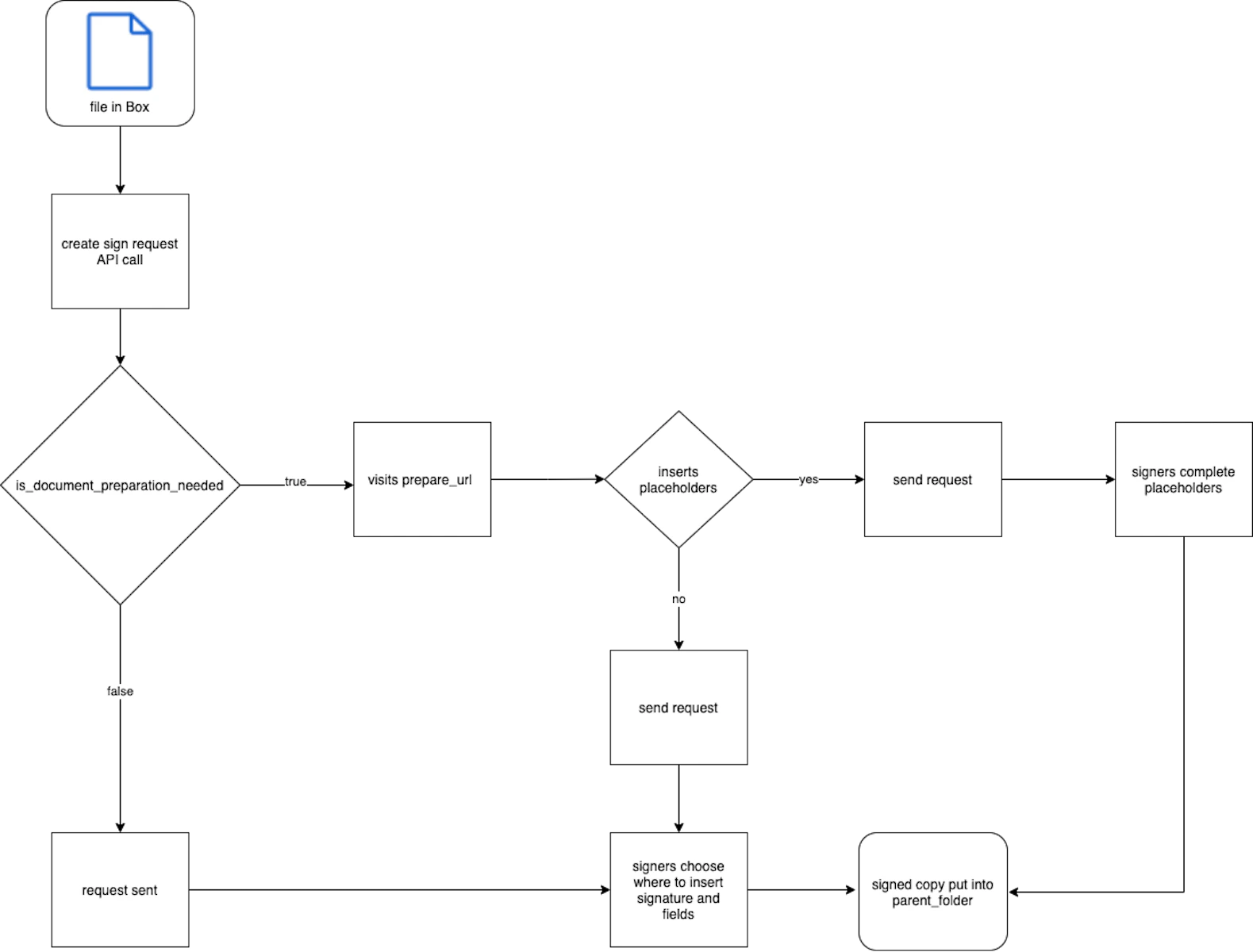
Preparing a document prior to sending a Box Sign request allows developers to
add date, text, checkbox, and/or signature placeholders for signers. This can be
done with UI or [tags][tags] directly in the document. If this is not done,
signers receive an unprepared document and can place signatures and fields at
their own discretion. However, developers can leverage controls in the request
that allow them to turn features for the unprepared document on and off.
Setting `is_document_preparation_needed` to `true` provides a `prepare_url` in
the response. Visiting this link in your browser allows you to complete document
preparation and send the request in the UI.
To learn more about document tags, please see our [support article][tags].
Prefill tags created in a template with the Box web app cannot be accessed from
the API.
## Files
Each Box Sign request begins with a file that needs to be signed. If the file
does not already exist in Box, it must be uploaded, in a separate
API call, prior to creating the request. Multiple files can be signed in one
request. File ID of the first file in a request is specified in the
`source_files` body parameter.
The requester must have download privileges to the file in Box. Review
our [collaboration levels][collab] to ensure this requirement is met.
Supported file types include:
* All documents
* All presentations
* Images: `png`, `jpg`, `jpeg`, `tiff` only
* Text-based files: `.csv`, `.txt` only
All file types are converted to `.pdf` for the signature process. This converted
document can be found in the `parent_folder` upon successfully sending a
request. This means that the final, signed document is a `.pdf`, regardless of
the original file type. As each signer completes the request, Box Sign will
automatically add a new file version.
File size limits are determined by your account type. Please see our
uploads guide for more information.
## Parent folder
The folder ID specified in the `parent_folder` body parameter determines the
destination of the final signed document and [signing log][log]. This folder
cannot be the All Files or root level, which is represented by folder ID `0`.
## Signers
Each signer must be assigned a [role][role]: `signer`, `approver`, or `final copy_reader`.
If the requester is not given a role, a signer with the role `final_copy_reader`
is automatically created. This means they only receive a copy of the final,
signed document and [signing log][log].
Signers do not need to have an existing Box account, nor create one, in order to
sign documents. Unlike other API endpoints, signers are invited by email address
and not Box `user_id`.
If necessary, signers can log in to Box before signing the request. In such
case set the parameter `login_required` to `true` for signers. If the signer
does not have an existing account, they will have an option to create a free
Box account.
You can also require signers to verify their identity before signing through SMS multifactor
authentication, a Box account login, or CAC/PIV smart card authentication. A password can be
added alongside any of these methods for an extra layer of protection. For more information,
see [Extra security](/sign/request-options/extra-security).
Box Sign will only attempt to send signing emails to the email addresses
provided for signers in the request. For Box users, this does not include email
aliases unless specified. Please double check to ensure all provided signer
email addresses are valid.
### Inputs
The `inputs` parameter represents placeholders that the user can interact with.
The `document_tag_id` parameter can be populated with data you want to
pass when creating a sign request.
## Templates
You can create a sign request using a template.
To do so, you must provide the `template_id` parameter.
See this guide to learn more about using templates
when creating sign requests.
## Redirects
The URLs specified in the `redirect_url` and `declined_redirect_url`
allow you to redirect signers to a custom landing page
after signing or declining the sign request.
For example, if you integrate your application with Box Sign,
you can redirect signers back to your application
or to a custom landing page.
You can set redirect URLs globally for all signers
as well as for specific signers only.
This means that Box Sign will use specific URLs
for signers of your choice, and global
settings for the rest.
If you don't configure any redirect URLs
Box Sign will redirect signers to a default page.
The default page includes the following note:
"Once the document has been completed by all parties,
a limited-time link to a finalized copy will be emailed to you,
and, if you have a Box account, a copy will be available in your account."
If you decide to redirect the signers to a different page, this information
will not be available to signers.
## Multiple signers and signing order
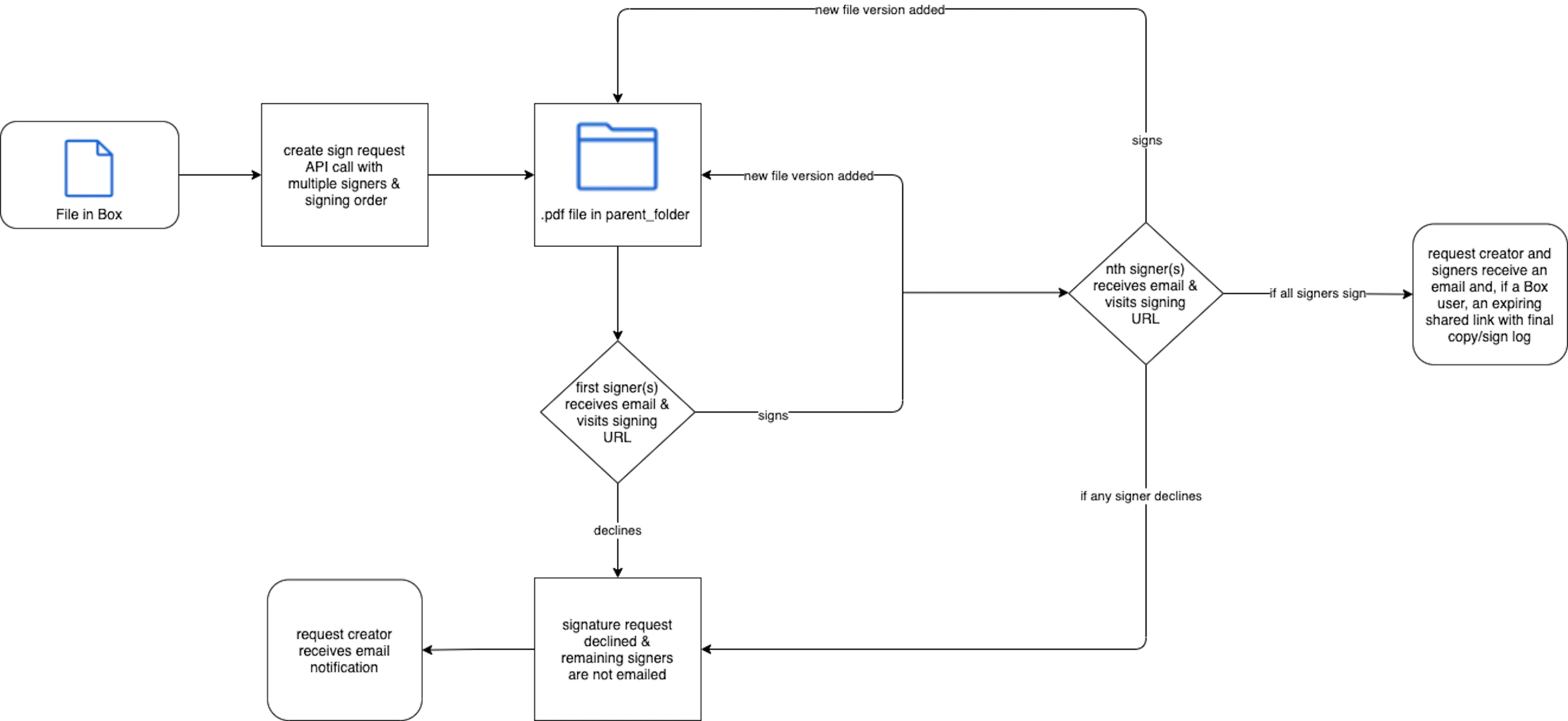
Signing order is determined by ordering the provided `order` numbers from
smallest to largest. If two numbers are the same, signers will receive the
request at the same time.
Initially, only the signer(s) with the lowest assigned `order` number will
receive a Box Sign request email. Once they sign, the following user(s) will
an email and so on. Box Sign automatically adds a new version of the
document to the `parent_folder` as each user signs.
If any signer declines, any remaining signers will not receive a Box Sign
request email. The overall request is declined.
## Request status
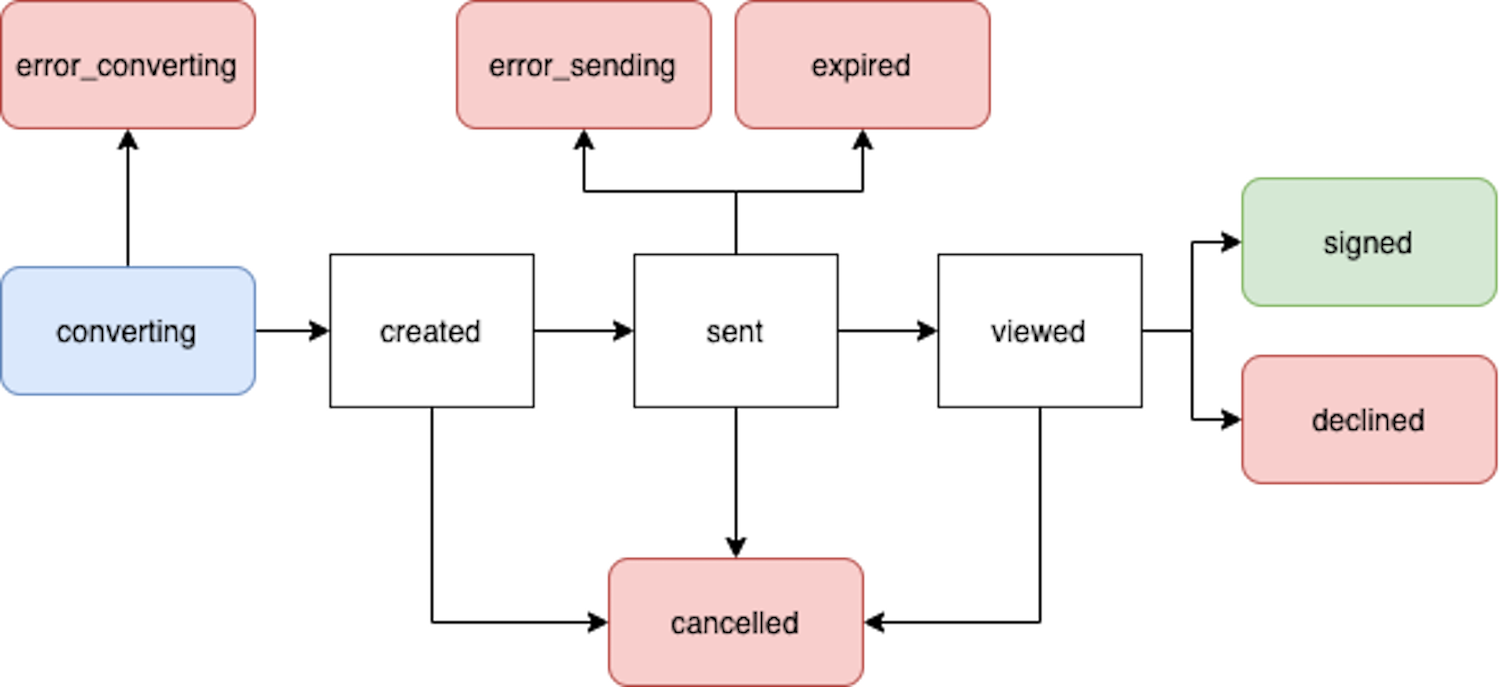
* `converting`: The file is converted to a `.pdf` for the signing process once the sign request is sent.
* `error_converting`: An issue was encountered while converting the file to a `.pdf`.
* `created`: If `document_preparation_is_needed` is set to `true`, but the `prepare_url` has not yet been visited.
* `sent`: The request was successfully sent, but no signer has interacted with it.
* `error_sending`: An issue was encountered while sending the request.
* `viewed`: Once the first, or only, signer clicks on **Review document** in the signing email or visits the signing URL.
* `downloaded`: The signing document was downloaded by signer.
* `signed`: All signers completed the request.
* `signed and downloaded`: The signing document was signed and downloaded by signer.
* `declined`: If any signer declines the request.
* `cancelled`: If the request is cancelled via UI or API.
* `expired`: The date of expiration has passed with outstanding, incomplete signatures.
* `finalizing`: If all signers have signed the request, but the final document with signatures and the signing log has not been generated yet.
* `error_finalizing`: If the `finalizing` phase did not complete successfully.
* `error`: A generic error status. When a request has this status, the `error_code` field identifies the specific reason, for example `cfr11_validation_failed`.
Encountering an error status requires creating a new sign request to retry.