> ## Documentation Index
> Fetch the complete documentation index at: https://developer.box.com/llms.txt
> Use this file to discover all available pages before exploring further.
# Extract metadata from file (structured)
> Use the POST /ai/extract_structured endpoint to extract metadata using templates, field definitions, or the Enhanced Extract Agent.
export const MultiRelatedLinks = ({sections = []}) => {
if (!sections || sections.length === 0) {
return null;
}
return
;
};
export const Link = ({href, children, className, ...props}) => {
const localizedHref = localizeLink(href);
return
{children}
;
};
With Box AI API, you can extract metadata from the provided file
and get the result in the form of key-value pairs.
As input, you can either create a structure using the `fields` parameter, or use an already defined metadata template.
To learn more about creating templates, see [Creating metadata templates in the Admin Console][templates-console] or use the metadata template API. You can also [autofill metadata in templates][autofill-metadata] using our Standard or Enhanced Extraction Agent.
## Supported file formats
The endpoint supports the following file formats:
* PDF
* DOC
* DOCX
* GDOC
* ODT
* Box Note
* TEXT
* RTF
* XDW
* AS
* TIFF
* TIF
* PNG
* JPEG
* JPG
* WEBP
* PPT
* PPTX
* GSLIDE
* GSLIDES
* ODP
* OTP
* XLS
* XLSX
* XLSM
* ODS
* CSV
* Languages: `.js`, `.py`, `.css`, `.php`, `.sql`
* JSON
* HTML
* XML
* MD
Box AI automatically applies optical character recognition (OCR) when processing image files (TIFF, PNG, JPEG) and scanned documents. This eliminates the need to convert images to PDF before extraction, saving time and simplifying your integration.
## Supported languages
Box AI can extract metadata from documents in the following languages:
* English
* Japanese
* Chinese
* Korean
- Cyrillic-based languages (such as Russian, Ukrainian, Bulgarian, and Serbian)
No additional configuration is required to use different languages or image formats. Box AI automatically detects the language and applies OCR when needed.
## Before you start
Make sure you followed the steps listed in getting started with Box AI to create a platform app and authenticate.
## Send a request
To send a request, use the
`POST /2.0/ai/extract_structured` endpoint.
```sh cURL theme={null}
curl -i -L 'https://api.box.com/2.0/ai/extract_structured' \
-H 'content-type: application/json' \
-H 'authorization: Bearer ' \
-d '{
"items": [
{
"id": "12345678",
"type": "file",
"content": "This is file content."
}
],
"metadata_template": {
"template_key": "",
"type": "metadata_template",
"scope": ""
},
"fields": [
{
"key": "name",
"description": "The name of the person.",
"displayName": "Name",
"prompt": "The name is the first and last name from the email address.",
"type": "string",
"options": [
{
"key": "First Name"
},
{
"key": "Last Name"
]
}
],
"ai_agent": {
"type": "ai_agent_extract_structured",
"long_text": {
"model": "openai__gpt_5_mini"
},
"basic_text": {
"model": "openai__gpt_5_mini"
}
}
}'
```
```typescript Node/TypeScript v10 theme={null}
await client.ai.createAiExtractStructured({
fields: [
{
key: 'firstName',
displayName: 'First name',
description: 'Person first name',
prompt: 'What is the your first name?',
type: 'string',
} satisfies AiExtractStructuredFieldsField,
{
key: 'lastName',
displayName: 'Last name',
description: 'Person last name',
prompt: 'What is the your last name?',
type: 'string',
} satisfies AiExtractStructuredFieldsField,
{
key: 'dateOfBirth',
displayName: 'Birth date',
description: 'Person date of birth',
prompt: 'What is the date of your birth?',
type: 'date',
} satisfies AiExtractStructuredFieldsField,
{
key: 'age',
displayName: 'Age',
description: 'Person age',
prompt: 'How old are you?',
type: 'float',
} satisfies AiExtractStructuredFieldsField,
{
key: 'hobby',
displayName: 'Hobby',
description: 'Person hobby',
prompt: 'What is your hobby?',
type: 'multiSelect',
options: [
{ key: 'guitar' } satisfies AiExtractStructuredFieldsOptionsField,
{ key: 'books' } satisfies AiExtractStructuredFieldsOptionsField,
],
} satisfies AiExtractStructuredFieldsField,
],
items: [new AiItemBase({ id: file.id })],
aiAgent: agentIgnoringOverridingEmbeddingsModel,
} satisfies AiExtractStructured);
```
```python Python v10 theme={null}
client.ai.create_ai_extract_structured(
[AiItemBase(id=file.id)],
fields=[
CreateAiExtractStructuredFields(
key="firstName",
display_name="First name",
description="Person first name",
prompt="What is the your first name?",
type="string",
),
CreateAiExtractStructuredFields(
key="lastName",
display_name="Last name",
description="Person last name",
prompt="What is the your last name?",
type="string",
),
CreateAiExtractStructuredFields(
key="dateOfBirth",
display_name="Birth date",
description="Person date of birth",
prompt="What is the date of your birth?",
type="date",
),
CreateAiExtractStructuredFields(
key="age",
display_name="Age",
description="Person age",
prompt="How old are you?",
type="float",
),
CreateAiExtractStructuredFields(
key="hobby",
display_name="Hobby",
description="Person hobby",
prompt="What is your hobby?",
type="multiSelect",
options=[
CreateAiExtractStructuredFieldsOptionsField(key="guitar"),
CreateAiExtractStructuredFieldsOptionsField(key="books"),
],
),
],
ai_agent=agent_ignoring_overriding_embeddings_model,
)
```
```cs .NET v10 theme={null}
await client.Ai.CreateAiExtractStructuredAsync(requestBody: new AiExtractStructured(items: Array.AsReadOnly(new [] {new AiItemBase(id: file.Id)})) { Fields = Array.AsReadOnly(new [] {new AiExtractStructuredFieldsField(key: "firstName") { DisplayName = "First name", Description = "Person first name", Prompt = "What is the your first name?", Type = "string" },new AiExtractStructuredFieldsField(key: "lastName") { DisplayName = "Last name", Description = "Person last name", Prompt = "What is the your last name?", Type = "string" },new AiExtractStructuredFieldsField(key: "dateOfBirth") { DisplayName = "Birth date", Description = "Person date of birth", Prompt = "What is the date of your birth?", Type = "date" },new AiExtractStructuredFieldsField(key: "age") { DisplayName = "Age", Description = "Person age", Prompt = "How old are you?", Type = "float" },new AiExtractStructuredFieldsField(key: "hobby") { DisplayName = "Hobby", Description = "Person hobby", Prompt = "What is your hobby?", Type = "multiSelect", Options = Array.AsReadOnly(new [] {new AiExtractStructuredFieldsOptionsField(key: "guitar"),new AiExtractStructuredFieldsOptionsField(key: "books")}) }}) });
```
```swift Swift v10 theme={null}
try await client.ai.createAiExtractStructured(requestBody: AiExtractStructured(fields: [AiExtractStructuredFieldsField(key: "firstName", displayName: "First name", description: "Person first name", prompt: "What is the your first name?", type: "string"), AiExtractStructuredFieldsField(key: "lastName", displayName: "Last name", description: "Person last name", prompt: "What is the your last name?", type: "string"), AiExtractStructuredFieldsField(key: "dateOfBirth", displayName: "Birth date", description: "Person date of birth", prompt: "What is the date of your birth?", type: "date"), AiExtractStructuredFieldsField(key: "age", displayName: "Age", description: "Person age", prompt: "How old are you?", type: "float"), AiExtractStructuredFieldsField(key: "hobby", displayName: "Hobby", description: "Person hobby", prompt: "What is your hobby?", type: "multiSelect", options: [AiExtractStructuredFieldsOptionsField(key: "guitar"), AiExtractStructuredFieldsOptionsField(key: "books")])], items: [AiItemBase(id: file.id)]))
```
```java Java v10 theme={null}
client.getAi().createAiExtractStructured(new AiExtractStructured.Builder(Arrays.asList(new AiItemBase(file.getId()))).fields(Arrays.asList(new AiExtractStructuredFieldsField.Builder("firstName").description("Person first name").displayName("First name").prompt("What is the your first name?").type("string").build(), new AiExtractStructuredFieldsField.Builder("lastName").description("Person last name").displayName("Last name").prompt("What is the your last name?").type("string").build(), new AiExtractStructuredFieldsField.Builder("dateOfBirth").description("Person date of birth").displayName("Birth date").prompt("What is the date of your birth?").type("date").build(), new AiExtractStructuredFieldsField.Builder("age").description("Person age").displayName("Age").prompt("How old are you?").type("float").build(), new AiExtractStructuredFieldsField.Builder("hobby").description("Person hobby").displayName("Hobby").prompt("What is your hobby?").type("multiSelect").options(Arrays.asList(new AiExtractStructuredFieldsOptionsField("guitar"), new AiExtractStructuredFieldsOptionsField("books"))).build())).aiAgent(agentIgnoringOverridingEmbeddingsModel).build())
```
```java Java v5 theme={null}
BoxAIExtractMetadataTemplate template = new BoxAIExtractMetadataTemplate("templateKey", "enterprise");
BoxAIExtractStructuredResponse result = BoxAI.extractMetadataStructured(
api,
Collections.singletonList(new BoxAIItem("123456", BoxAIItem.Type.FILE)),
template
);
JsonObject sourceJson = result.getSourceJson();
```
### Parameters
To make a call, you must pass the following parameters. Mandatory parameters are in **bold**.
The `items` array must contain exactly one element. For prompt and file limits, see input limits.
| Parameter | Description | Example |
| ------------------------------------ | -------------------------------------------------------------------------------------------------------------------------------------------------------------------------------------------------------------------------------------------------------------------------------------------------------------------------------------------- | -------------------------------------------------------- |
| **`metadata_template`** | The metadata template containing the fields to extract. For your request to work, you must provide either `metadata_template` or `fields`, but not both. | |
| **`metadata_template.type`** | The type of metadata template. | `metadata_template` |
| **`metadata_template.scope`** | The scope of the metadata template that can either be `global` or `enterprise`. Global templates are those available to any Box enterprise, whereas `enterprise` templates are bound to a specific enterprise. | `metadata_template` |
| **`metadata_template.template_key`** | The name of your metadata template. | `invoice` |
| **`items.id`** | Box file ID of the document. The ID must reference an actual file with an extension. | `1233039227512` |
| **`items.type`** | The type of the supplied input. | `file` |
| `ai_agent` | Override the default model configuration. Lets you change the model, prompt template, system message, or LLM parameters. See the override system for how it works and AI model overrides for examples. | |
| `include_confidence_score` | A flag to indicate whether to include the confidence score for every extracted field. | `true` |
| `include_reference` | A flag to indicate whether to include references for every extracted field. | `true` |
| `items.content` | The content of the item, often the text representation. | `This article is about Box AI`. |
| `fields.description` | A description of the field. | `The person's name.` |
| `fields.displayName` | The display name of the field. | `Name` |
| `fields.key` | A unique identifier for the field. | `name` |
| `fields.namespace` | The namespace of the taxonomy source. Required if using `taxonomy` type field from an existing taxonomy. | `string` |
| `fields.options` | A list of options for this field. This is most often used in combination with the `enum` and `multiSelect` field types. | `[{"key":"First Name"},{"key":"Last Name"}]` |
| `fields.options.key` | A unique identifier for the field. | `First Name` |
| `fields.prompt` | Additional context about the key (identifier) that can include how to find and format it. | `Name is the first and last name from the email address` |
| `fields.type` | The type of the field. It includes but is not limited to `string`, `float`, `date`, `enum`, `multiSelect`, `struct`, `table`. | `string` |
| `fields.taxonomy_key` | The identifier for a taxonomy, which corresponds to the `key` of the taxonomy source. Required if using `taxonomy` type field. | `string` |
### `struct` and `table` field types
The Box AI `extract_structured` API supports two complex field types — `struct` and
`table` in addition to the existing scalar types (`string`, `float`, `date`, `enum`,
`multiSelect`).
The `struct` and `table` types allow you to extract grouped and repeating structured
data from documents.
For best results, use the [enhanced extract agent](/guides/box-ai/ai-tutorials/extract-metadata-structured#enhanced-extract-agent).
#### `struct` field type
Use the `struct` type to group multiple related sub-fields into a single named JSON object.
This is useful when you want to extract a set of related values that belong together and
receive them as one structured object rather than separate flat fields.
Example: an address or a person's contact details.
A `struct` field requires a `fields` array that defines its sub-fields. Each sub-field is an
object with the following properties:
* `key`: The unique identifier for the sub-field.
* `type`: The type of the sub-field. Supported types are `string`, `text`, `number`, `float`, `boolean`, `date`, `enum`, `multiSelect`, and `array[]` (e.g. `array[string]`). Nested `struct` or `table` types are not supported as sub-fields.
* `displayName`: The display name of the sub-field.
* `description`: A description of the sub-field.
* `prompt`: Additional context about the sub-field that can include how to find and format it.
You can add a prompt at the `struct` field level when instructions apply to the whole grouped object.
The output is a single JSON object containing the extracted sub-field values.
**Example request for the `struct` field type**
```json theme={null}
{
"fields": [
{
"key": "address",
"displayName": "Address",
"type": "struct",
"fields": [
{ "key": "street_name", "type": "string" },
{ "key": "home_number", "type": "string" },
{ "key": "postal_code", "type": "string" },
{ "key": "city", "type": "string" }
]
}
]
}
```
**Response:**
```json theme={null}
{
"answer": {
"address": {
"street_name": "Main St",
"home_number": "123",
"postal_code": "94105",
"city": "San Francisco"
}
}
}
```
#### `table` field type
Use the `table` type to extract repeating rows of structured data as an array of JSON objects,
where each object represents one row.
This is useful when a document contains multiple instances of the same data structure,
for example: line items in an invoice or entries in a tax table.
A `table` field requires a `fields` array that defines the columns (sub-fields) of each row.
The sub-field properties and supported types are identical to those of `struct`.
Table extraction is not limited to visually formatted tables. The `table` type correctly extracts repeating data whether it appears as a grid, key-value pairs, a form layout, or plain prose.
The output is an array of JSON objects, where each object represents one extracted row.
**Example request for the `table` field type**
```json theme={null}
{
"fields": [
{
"key": "line_items",
"displayName": "Line Items",
"type": "table",
"fields": [
{ "key": "description", "type": "string" },
{ "key": "quantity", "type": "float" },
{ "key": "amount", "type": "float" }
]
}
]
}
```
**Response:**
```json theme={null}
{
"answer": {
"line_items": [
{ "description": "Desk", "quantity": 2.0, "amount": 399.99 },
{ "description": "Chair", "quantity": 4.0, "amount": 149.99 }
]
}
}
```
#### Supported sub-field types
The following types are supported within both struct and table fields.
| Type | Notes |
| ------------- | ------------------------- |
| `string` | Scalar or array\[string] |
| `text` | Scalar or array\[text] |
| `number` | Scalar or array\[number] |
| `float` | Scalar or array\[float] |
| `boolean` | Scalar or array\[boolean] |
| `date` | Scalar or array\[date] |
| `enum` | Single occurrence only |
| `multiSelect` | Single occurrence only |
Nested `struct` and `table` types are not supported as sub-fields.
See the `struct` and `table` field types in action. Extract grouped vendor details and a repeating delivery schedule from a supplier agreement, then map the result to a downstream procurement record.
## Use cases
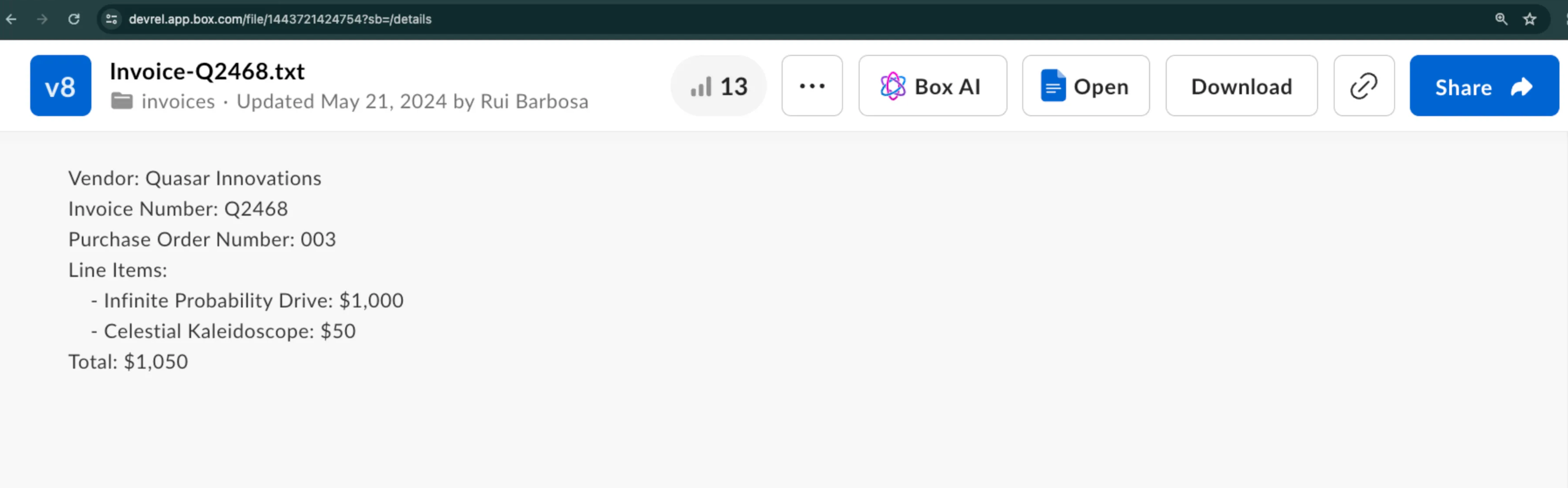
This example shows you how to extract metadata from a sample invoice in a structured way.
Let's assume you want to extract the vendor name, invoice number, and a few more details.
### Create the request
To get the response from Box AI, call `POST /2.0/ai/extract_structured` endpoint with the following parameters:
* `items.type` and `items.id` to specify the file to extract the data from.
* `fields` to specify the data that you want to extract from the given file.
* `metadata_template` to supply an already existing metadata template.
You can use either `fields` or `metadata_template` to specify your structure, but not both.
### Use `fields` parameter
The `fields` parameter allows you to specify the data you want to extract. Each `fields` object has a subset of parameters you can use to add more information about the searched data.
For example, you can add the field type, description, or even a prompt with some additional context.
```bash theme={null}
curl --location 'https://api.box.com/2.0/ai/extract_structured' \
--header 'Content-Type: application/json' \
--header 'Authorization: Bearer '' \
--data '{
"items": [
{
"id": "1517628697289",
"type": "file"
}
],
"fields": [
{
"key": "document_type",
"type": "enum",
"prompt": "what type of document is this?",
"options": [
{
"key": "Invoice"
},
{
"key": "Purchase Order"
},
{
"key": "Unknown"
}
]
},
{
"key": "document_date",
"type": "date"
},
{
"key": "vendor",
"description": "The name of the entity.",
"prompt": "Which vendor is sending this document.",
"type": "string"
},
{
"key": "document_total",
"type": "float"
}
]
}'
```
The response lists the specified fields and their values:
```bash theme={null}
{
"document_date": "2024-02-13",
"vendor": "Quasar Innovations",
"document_total": $1050,
"document_type": "Purchase Order"
}
```
### Use metadata template
If you prefer to use a metadata template, you can provide its `template_key`, `type`, and `scope`.
```bash theme={null}
curl --location 'https://api.box.com/2.0/ai/extract_structured' \
--header 'Content-Type: application/json' \
--header 'Authorization: Bearer ' \
--data '{
"items": [
{
"id": "1517628697289",
"type": "file"
}
],
"metadata_template": {
"template_key": "rbInvoicePO",
"type": "metadata_template",
"scope": "enterprise_1134207681"
}
}'
```
The response lists the fields included in the metadata template and their values:
```bash theme={null}
{
"documentDate": "February 13, 2024",
"total": "$1050",
"documentType": "Purchase Order",
"vendor": "Quasar Innovations",
"purchaseOrderNumber": "003"
}
```
### Enhanced Extract Agent
To use the Enhanced Extract Agent, specify the `ai_agent` object as follows:
```bash theme={null}
{
"ai_agent": {
"type": "ai_agent_id",
"id": "enhanced_extract_agent"
}
}
```
To extract data using the Enhanced Extract Agent you need one of the following:
* [Inline field definitions][inline-field] (best when fields change frequently)
* [Metadata template][metadata-template] (best when fields stay consistent)
See the sample code snippet using Box Python SDK:
```Python theme={null}
from box_sdk_gen import (
AiAgentReference,
AiAgentReferenceTypeField,
AiItemBase,
AiItemBaseTypeField,
BoxClient,
BoxCCGAuth,
CCGConfig,
CreateAiExtractStructuredMetadataTemplate
)
# Create your client credentials grant config from the developer console
ccg_config = CCGConfig(
client_id="my_box_client_id", # replace with your client id
client_secret="my_box_client_secret", # replace with your client secret
user_id="my_box_user_id", # replace with the box user id that has access
# to the file you are referencing
)
auth = BoxCCGAuth(config=ccg_config)
client = BoxClient(auth=auth)
# Create the agent config referencing the enhanced extract agent
enhanced_extract_agent_config = AiAgentReference(
id="enhanced_extract_agent",
type=AiAgentReferenceTypeField.AI_AGENT_ID
)
# Use the Box SDK to call the extract_structured endpoint
box_ai_response = client.ai.create_ai_extract_structured(
# Create the items array containing the file information to extract from
items=[
AiItemBase(
id="my_box_file_id", # replace with the file id
type=AiItemBaseTypeField.FILE
)
],
# Reference the Box Metadata template
metadata_template=CreateAiExtractStructuredMetadataTemplate(
template_key="InvoicePO",
scope="enterprise"
),
# Attach the agent config you created earlier
ai_agent=enhanced_extract_agent_config,
)
print(f"box_ai_response: {box_ai_response.answer}")
```
[templates-console]: https://support.box.com/hc/en-us/articles/360044194033-Customizing-Metadata-Templates
[changelog]: /changelog
[blog]: https://medium.com/box-developer-blog
[inline-field]: #use-fields-parameter
[metadata-template]: #use-metadata-template
[autofill-metadata]: https://support.box.com/hc/en-us/articles/360044196173-Using-Metadata#h_01JJSRYKDKXHGJT9ZHCW1E9RX5
See structured extraction in action. Build an end-to-end automation that watches a folder, extracts invoice fields, and writes metadata back to each file.
 ### Create the request
To get the response from Box AI, call `POST /2.0/ai/extract_structured` endpoint with the following parameters:
* `items.type` and `items.id` to specify the file to extract the data from.
* `fields` to specify the data that you want to extract from the given file.
* `metadata_template` to supply an already existing metadata template.
### Create the request
To get the response from Box AI, call `POST /2.0/ai/extract_structured` endpoint with the following parameters:
* `items.type` and `items.id` to specify the file to extract the data from.
* `fields` to specify the data that you want to extract from the given file.
* `metadata_template` to supply an already existing metadata template.