The Box SDKs have built-in support for client-side OAuth 2.0.
In the process a user is redirected to the Box web app in a browser where they
log in and authorize the application access to their data before they are
redirected back to the applications redirect_url. This last step requires the
application to be running on a web server somewhere accessible to the user.
Overview
To complete an OAuth 2.0 flow the following steps need to be completed.
- Configure the Box SDK
- Redirect the user to the Box website
- The user grants the application access
- Exchange the authorization code for an access token
At the end of this flow, the application has an Access Token that can be used to
make API calls on behalf of this user.
The access token acquired through OAuth 2.0 is inherently tied to the user who
authorized the application. Any API call made with this token will seem to
come from this application, and the user needs to have access to any file or
folder the application tries to access with this token.
Parameters
| Parameter | Description |
|---|
CLIENT_ID | The client ID or API key for the application |
CLIENT_SECRET | The client secret or API secret for the application |
REDIRECT_URI | The redirect URL for your application that a user will be sent to after they have authorized the application. This can be configured in the developer console |
The first step is to make sure your environment has been prepared with the SDK of
your choice.
var redirectUrl = "[REDIRECT_URI]";
var config = new BoxConfig("[CLIENT_ID]", "[CLIENT_SECRET]", new Uri(redirectUrl));
var sdk = new BoxClient(config);
Learn more about installing an SDK for your environment
2. Redirect user
Next, redirect the user to the authorization URL. Most of the SDKs support a
way to get the authorization URL for an SDK client.
If you configured multiple redirect URIs for the application, the authorization
URL must include the redirect_uri parameter matching one of the URIs
configured in the developer console. If the parameter is not specified, the
user will see a redirect_uri_missing error and will not be redirected back to
the app after granting application access.
var authorizationUrl = "https://account.box.com/api/oauth2/authorize?client_id=[CLIENT_ID]&response_type=code";
// redirectTo(authorizationUrl);
The way in which a user is redirected to a URL depends on the application
framework used. Most framework documentation provides extensive guidance on
this topic.
The authorization URL can also be created manually
as follows.
https://account.box.com/api/oauth2/authorize?client_id=[CLIENT_ID]&redirect_uri=[REDIRECT_URI]&response_type=code
Additional query parameters can be passed along when redirecting the user to
limit down the scope, or pass along some extra state. See the reference
documentation for more information.
If you have Box Verified Enterprise for your Box
instance turned on, you
may encounter an issue using the standard
account.box.com base URL.
Instead, use ent.box.com in place of account.box.com.
3. User grants application access
Once the user is redirected to the Box web app they will have to log in. After
they logged in they are presented with a screen to approve your application.
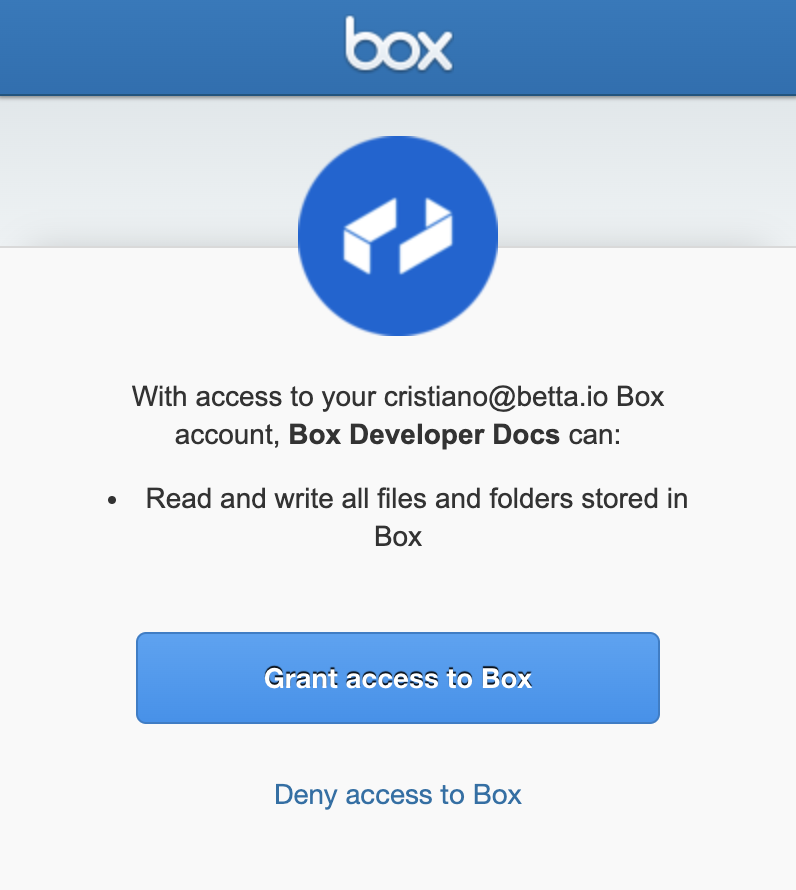
When the user accepts this requests and clicks the button, the browser will
redirect to your application’s redirect URL as configured in the developer console.
4. Exchange code
The user is redirected to your application’s redirect URL with a query parameter
containing a short-lived authorization code.
https://your.domain.com/path?code=1234567
This code is not an Access Token and is only valid for a few seconds.
The SDKs can be used to exchange the code for an actual Access Token.
var session = await sdk.Auth.AuthenticateAsync("[CODE]");
var client = new BoxClient(config, session);
At the end of this flow, the application has an Access Token that can be used to
make API calls on behalf of this user.
Using SDKs and OAuth 2.0
To learn more about OAuth 2.0 authentication for each SDK head over to: