> ## Documentation Index
> Fetch the complete documentation index at: https://developer.box.com/llms.txt
> Use this file to discover all available pages before exploring further.
# As-User Header
export const MultiRelatedLinks = ({sections = []}) => {
if (!sections || sections.length === 0) {
return null;
}
return
{sections.map((section, index) => )}
;
};
export const RelatedLinks = ({title, items = []}) => {
const getBadgeClass = badge => {
if (!badge) return "badge-default";
const badgeType = badge.toLowerCase().replace(/\s+/g, "-");
return `badge-${badge === "ガイド" ? "guide" : badgeType}`;
};
if (!items || items.length === 0) {
return null;
}
return ;
};
It is possible to for an OAuth 2.0 application to act on behalf of another user
through the `as-user` header.
```sh theme={null}
curl https://api.box.com/2.0/folders/0 \
-H "as-user: [USER_ID]"
-H "authorization: Bearer [ACCESS_TOKEN]"
```
In this situation the user ID is the Box identifier for a user. User IDs can be
found for any user via the `GET /users` endpoint, which is only available to
admins, or by calling the `GET /users/me` endpoint with an authenticated user session.
## Preconditions
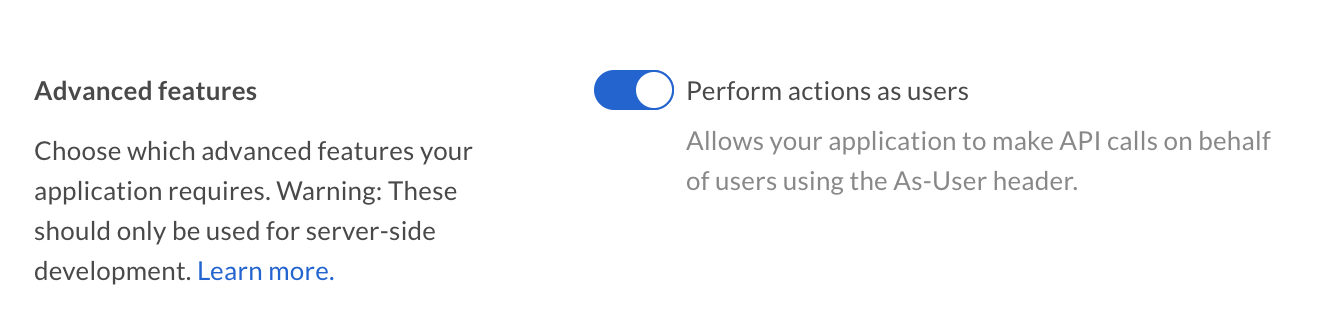
Using the `as-user` header has a few requirements. Firstly, the application
needs to be configured to perform actions as users in the [Developer
Console][devconsole].
 Additionally, the authenticated user needs to be a user with admin permissions,
meaning either an admin, co-admin, or service account. Co-admin users will also
need the 'Manage Users' permission scope. See our guide on [User
Types](/platform/user-types) for more details.
## as-user using SDKs
```csharp .NET theme={null}
var user_client = new BoxClient(config, session, asUser: '[USER_ID]');
```
```java Java theme={null}
client.asUser([USER_ID]");
// client.asSelf();
```
```python Python theme={null}
user_to_impersonate = client.user(user_id='[USER_ID]')
user_client = client.as_user(user_to_impersonate)
```
```js Node theme={null}
client.asUser('[USER_ID]');
// client.asSelf();
```
Please note that some of our SDKs create new clients for the other user, while
others modify the existing client and provide a way to return to a state where
the client authenticates for the original user itself.
[devconsole]: https://app.box.com/developers/console
Additionally, the authenticated user needs to be a user with admin permissions,
meaning either an admin, co-admin, or service account. Co-admin users will also
need the 'Manage Users' permission scope. See our guide on [User
Types](/platform/user-types) for more details.
## as-user using SDKs
```csharp .NET theme={null}
var user_client = new BoxClient(config, session, asUser: '[USER_ID]');
```
```java Java theme={null}
client.asUser([USER_ID]");
// client.asSelf();
```
```python Python theme={null}
user_to_impersonate = client.user(user_id='[USER_ID]')
user_client = client.as_user(user_to_impersonate)
```
```js Node theme={null}
client.asUser('[USER_ID]');
// client.asSelf();
```
Please note that some of our SDKs create new clients for the other user, while
others modify the existing client and provide a way to return to a state where
the client authenticates for the original user itself.
[devconsole]: https://app.box.com/developers/console