
Documentation Index

Fetch the complete documentation index at: https://developer.box.com/llms.txt

Use this file to discover all available pages before exploring further.

It is possible to for an OAuth 2.0 application to act on behalf of another user through the as-user header.
curl https://api.box.com/2.0/folders/0 \
    -H "as-user: [USER_ID]"
    -H "authorization: Bearer [ACCESS_TOKEN]"
In this situation the user ID is the Box identifier for a user. User IDs can be found for any user via the GET /users endpoint, which is only available to admins, or by calling the GET /users/me endpoint with an authenticated user session.

Preconditions

Using the as-user header has a few requirements. Firstly, the application needs to be configured to perform actions as users in the Developer Console.
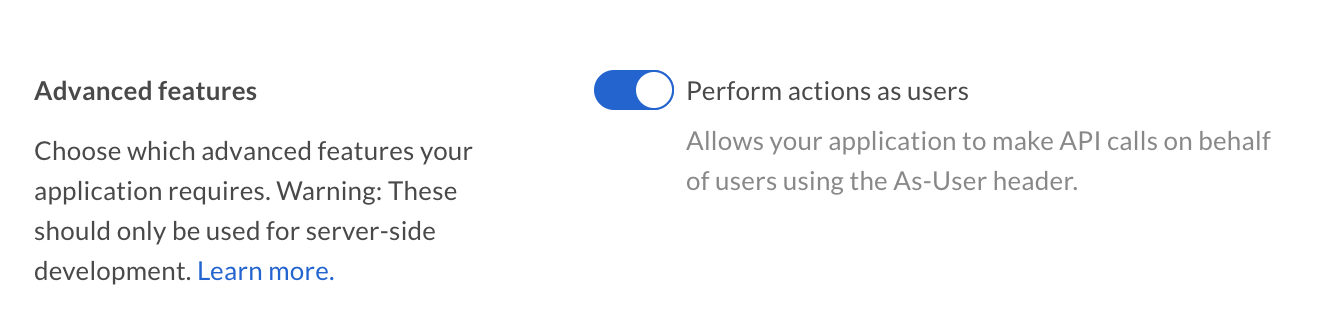
Advanced Features
Additionally, the authenticated user needs to be a user with admin permissions, meaning either an admin, co-admin, or service account. Co-admin users will also need the ‘Manage Users’ permission scope. See our guide on User Types for more details.

as-user using SDKs

var user_client = new BoxClient(config, session, asUser: '[USER_ID]');
Please note that some of our SDKs create new clients for the other user, while others modify the existing client and provide a way to return to a state where the client authenticates for the original user itself.